Beginning Cutover
Once the destination is Provisioned, the Begin cutover button appears on the Overview tab. Clicking it opens the Begin cutover dialog, which runs a best-effort scan of the source and requires an explicit acknowledgment before the job enters Cutover in progress. This action requires the JobCutover permission.
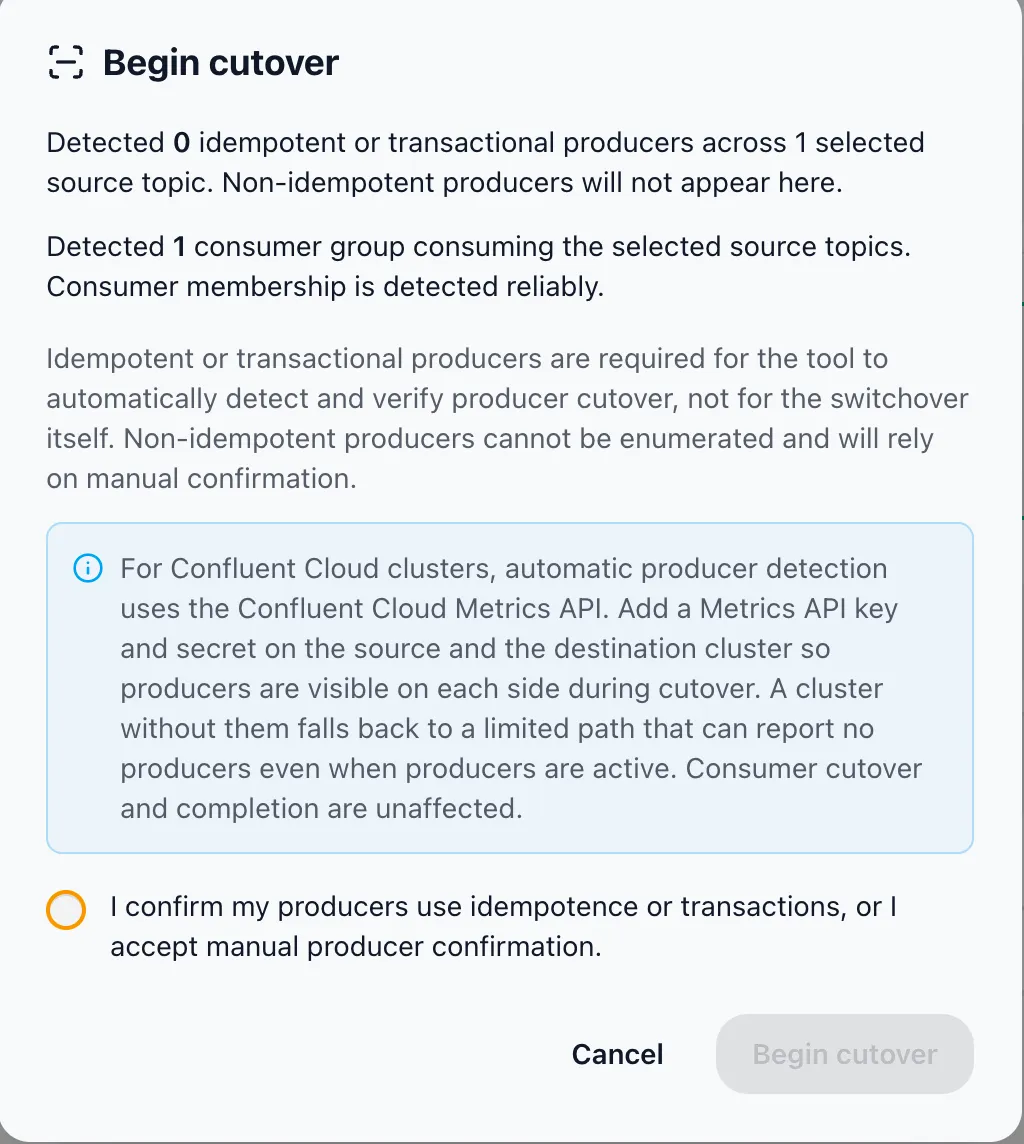
The Source Scan
Section titled “The Source Scan”On open, the dialog scans the selected source topics and reports two things separately, because their reliability differs.
Producers (best effort)
Section titled “Producers (best effort)”Producer detection is best effort — only some producers can be enumerated. How they are detected depends on the source cluster:
| Detection path | What is visible |
|---|---|
Confluent Cloud Metrics API (activity) | Both detectors run concurrently — Confluent Cloud client metrics and broker producer state (DescribeProducers) — and the larger of the two counts is shown. Includes non-idempotent producers. Recently stopped producers may still appear for a few minutes. |
Broker state only (describe) | Idempotent or transactional producers only (DescribeProducers). Non-idempotent producers do not appear. |
Consumer groups (robust)
Section titled “Consumer groups (robust)”Consumer group membership is detected reliably via DescribeGroups. The dialog reports the number of consumer groups consuming the selected source topics. This is the signal that authoritatively gates completion.
Scan Failures
Section titled “Scan Failures”If the producer or consumer scan cannot complete, the dialog says so but does not block you. You can still proceed by acknowledging manual producer confirmation. If no source topics are selected, the dialog warns that there is nothing to cut over.
Acknowledgment and Start
Section titled “Acknowledgment and Start”A required acknowledgment checkbox must be ticked before Begin cutover is enabled. Its label is worded for the detection path that ran:
- Metrics API path: “I understand producer detection is best effort and accept that producer cutover relies on my confirmation.”
- Broker-state path: “I confirm my producers use idempotence or transactions, or I accept manual producer confirmation.”
Confirming starts the cutover. The job moves to Cutover in progress and the cutover cockpit becomes live.
Seed Re-Verification on Confirm
Section titled “Seed Re-Verification on Confirm”Before the job enters cutover, confirming the modal first re-verifies the consumer-group seed offsets on the destination. The committed offsets of an empty group expire after the broker’s offsets retention (7 days by default), so a long gap between provisioning and cutover can silently erase them.
- Expired or missing seeds are re-committed.
- A group whose committed offsets are still live is never touched.
- Re-seeded groups are called out in the begin-cutover audit entry.
Permissions and Audit
Section titled “Permissions and Audit”The cutover actions and the read-only views are gated differently:
- Read permission — the live producer scan and the cutover-tracking reads (the Topics and Consumer Groups cutover columns and the cockpit) require only a read permission. Viewing the cutover does not require a mutating permission.
- Switchover cutover permission — Begin cutover (entering cutover), the producer acknowledgment, the individual cutover step actions, and Mark complete are mutations that require the switchover cutover permission. This is a new permission added specifically for switchover cutover, because no existing JobManage* permission applied. The server rejects direct calls that lack it.
The producer acknowledgment, each cutover step action, cutover model changes, and completion are audit-logged (for example switchover.cutover.acknowledge and switchover.complete).