Gateway Detail
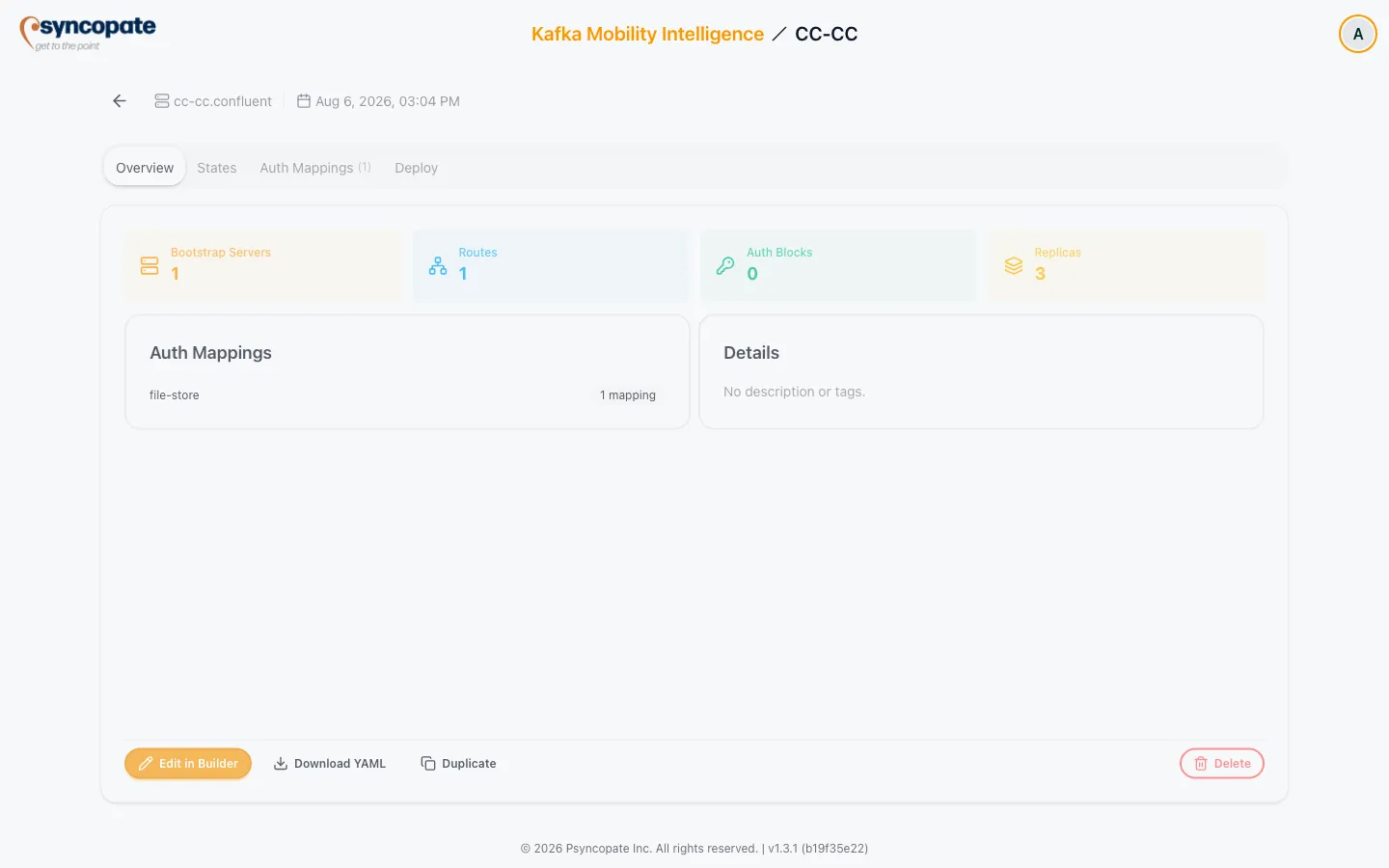
Clicking a gateway card opens its detail page. The header shows a Back button (returns to the Gateways dashboard tab), the gateway’s name.namespace, and its last-updated date and time, followed by up to four tabs across the top.
Opening the page with a ?tab= query parameter (for example ?tab=deploy) selects that tab automatically, except for the Deploy tab, which is silently ignored for view-only users (see the Deploy Tab section below).
Overview Tab
Section titled “Overview Tab”Shows four stat tiles computed from the Init state: Bootstrap Servers, Routes, Auth Blocks, and Replicas. Below that:
- An Auth Mappings summary card, listing each secret store with its mapping count, or “No auth mappings configured.” when there are none.
- A Details card with the description and tags, or “No description or tags.” when both are empty.
Users with the Infrastructure Manage permission see action buttons here too: Edit in Builder, Download YAML, Duplicate, and a destructive Delete. View-only users see the same tiles and cards, but no action buttons.
- Download YAML opens a modal to pick a state (Init, Fenced, Switchover, with Init selected by default), each with a short caption describing that state. Download is disabled until a state with generated YAML is selected, and blocked with a “Fix validation errors first” toast if any state has error-severity validation issues. See Validation Reference for what blocks a download where.
- Duplicate opens a confirmation naming the new gateway
ALIAS-copyand explaining it will carry a copy of all the original’s state configs. That confirmation text doesn’t mention it, but auth mappings are not actually copied, the duplicate starts with none, even for secret stores its routes still reference, so recreate them in the builder afterward. - Delete opens a confirmation warning the action cannot be undone. If the gateway is still referenced, the confirmation lists what references it and disables the delete button until it’s clear: “Stop the jobs before deleting this gateway.” for a referencing job, and “Unlink it from the referencing migration plan before deleting this gateway.” for a plan. On success, you’re returned to the Gateways dashboard tab.
States Tab
Section titled “States Tab”Shows the heading “Gateway State Configs” and four stat cards (Bootstraps, Routes, Auth Blocks, Replicas) that recompute for whichever state sub-tab is selected. Three sub-tabs are available, Init, Fenced, and Switchover, each with a one-line summary of what that state holds. Lifecycle States covers the same three states in full.
Below the sub-tabs, the selected state’s actual configuration is broken down into tables; a state with nothing configured yet shows “This state has no blocks configured yet.”
- Bootstrap Servers: Streaming Domain, Bootstrap ID, and Endpoint columns.
- Routes: Name, Endpoint, a Strategy badge (the broker identification strategy value), and an Auth column rendered as
client: NAME - cluster: NAME, or a dash when no auth is referenced. - Auth Blocks: shown as badges in the format
NAME (side/authType), for exampleclient-scram (client/scram).
Auth Mappings Tab
Section titled “Auth Mappings Tab”The tab label shows a count in parentheses. Mappings are grouped by secret store, each group header showing the store name and a count of “N mapping(s)”. Each group is a table of Label / Source key / Destination key, where Destination key shows the mapped destination key (or a dash if unset), followed by @ vaultPath when the store is a Vault store with a path set. When there are none, the tab shows “No auth mappings configured. Open the builder to add some.”
Deploy Tab
Section titled “Deploy Tab”The tab lazily renders deployment assets the first time it’s opened, showing “Rendering deployment assets…” while loading, and “Could not load deployment assets for this gateway.” on failure. Assets refresh automatically after you save an edit in the builder, so you never see a stale YAML/secret snapshot from before your last change.
If any generated CR contains unresolved bracket-token placeholders, a banner reads “N unresolved value(s) - replace before applying,” listing each token.
Below that, an Apply sequence card walks through the steps that take this gateway from generated YAML to a running deployment, with a Download all CRs button next to its heading. That button is gated by the same validation-error check as the builder’s Download, and refuses with a “Fix validation errors first” toast while any state has an error. Deployment Assets covers that procedure, and what each state’s Secrets contain, in full.