Provisioning the Destination
Before any cutover can happen, the destination cluster must be provisioned. Provisioning creates the destination structure — topics, ACLs, and consumer-group start-offset seeds — without copying any message data. (Schemas are an optional add-on; see Schema Provisioning.) A switchover job’s Overview tab replaces the replication Start / Pause / Stop controls with the switchover lifecycle actions: Provision destination, Begin cutover, and Sync now, alongside Edit and Delete.
Provision Destination
Section titled “Provision Destination”A newly created job’s badge reads Configured. Opening the job page does not start provisioning — the badge stays Configured until you click Provision destination. Three resource types are provisioned, each reported independently:
- Topics — created empty on the destination to match the selected source topics.
- ACLs — provisioned on the destination for the selected principals.
- Consumer groups — start offsets seeded so consumers can resume at the correct place.
The job’s Overview tab summarizes the source and destination clusters, the provisioning scope, the seed and override settings, and the current provision status, with the Provision destination action below.
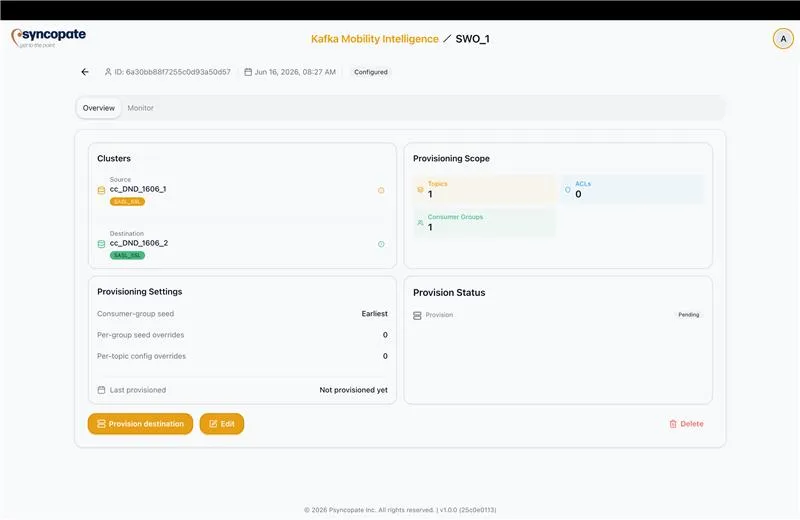
Provisioning runs asynchronously and can be long-running (a job may have thousands of topics). Starting it returns immediately and the badge changes to Provisioning; the run continues server-side. While a run is in progress, the Provision and Sync now controls are disabled so a second run cannot start for the same job (single-flight).
Live Progress
Section titled “Live Progress”While the run proceeds, the provisioning report fills in incrementally — rows and counts appear over time, not all at once at the end:
- The per-resource tables (Topics, ACLs, Consumer Groups) populate as resources are processed.
- The created, skipped, and failed counts for each type update live.
- The status header shows a per-resource roll-up as in-place / total, where in-place counts both created and skipped resources. A run where every resource already existed reads as the full count (for example
5/5, not0/5) and stays green. The roll-up verb follows the resource: topics and ACLs read “provisioned”, consumer groups read “seeded”.
Progress does not depend on keeping the job page open. Navigating away and back, or closing and reopening the browser, shows the run still progressing or its final result. If the live connection drops, it reconnects on its own without a manual refresh, and two tabs on the same job show the same progress.
Completion and Per-Resource Outcomes
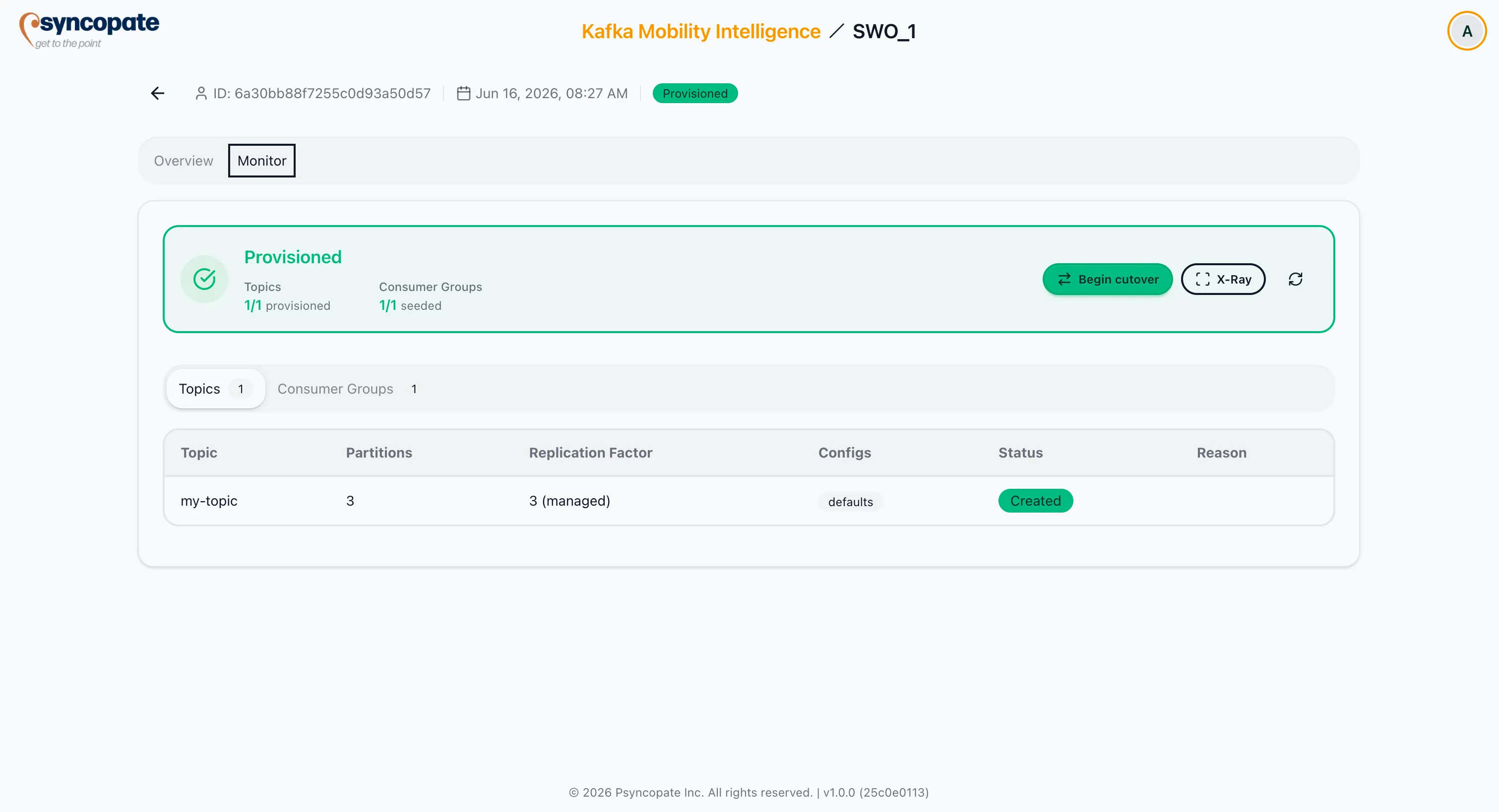
Section titled “Completion and Per-Resource Outcomes”When every resource succeeds, the badge changes to Provisioned (green) with all rows created or skipped and zero failures. If one or more resources fail, the badge changes to Failed (red) and each failed row shows a short, human-readable reason — never a raw stack trace.
The job’s Monitor tab shows the provision-result tables: a status summary with the per-resource roll-up (for example Topics 1/1 provisioned, Consumer Groups 1/1 seeded) and a tab per resource type. Once the destination is Provisioned, the Begin cutover and X-Ray controls appear here.
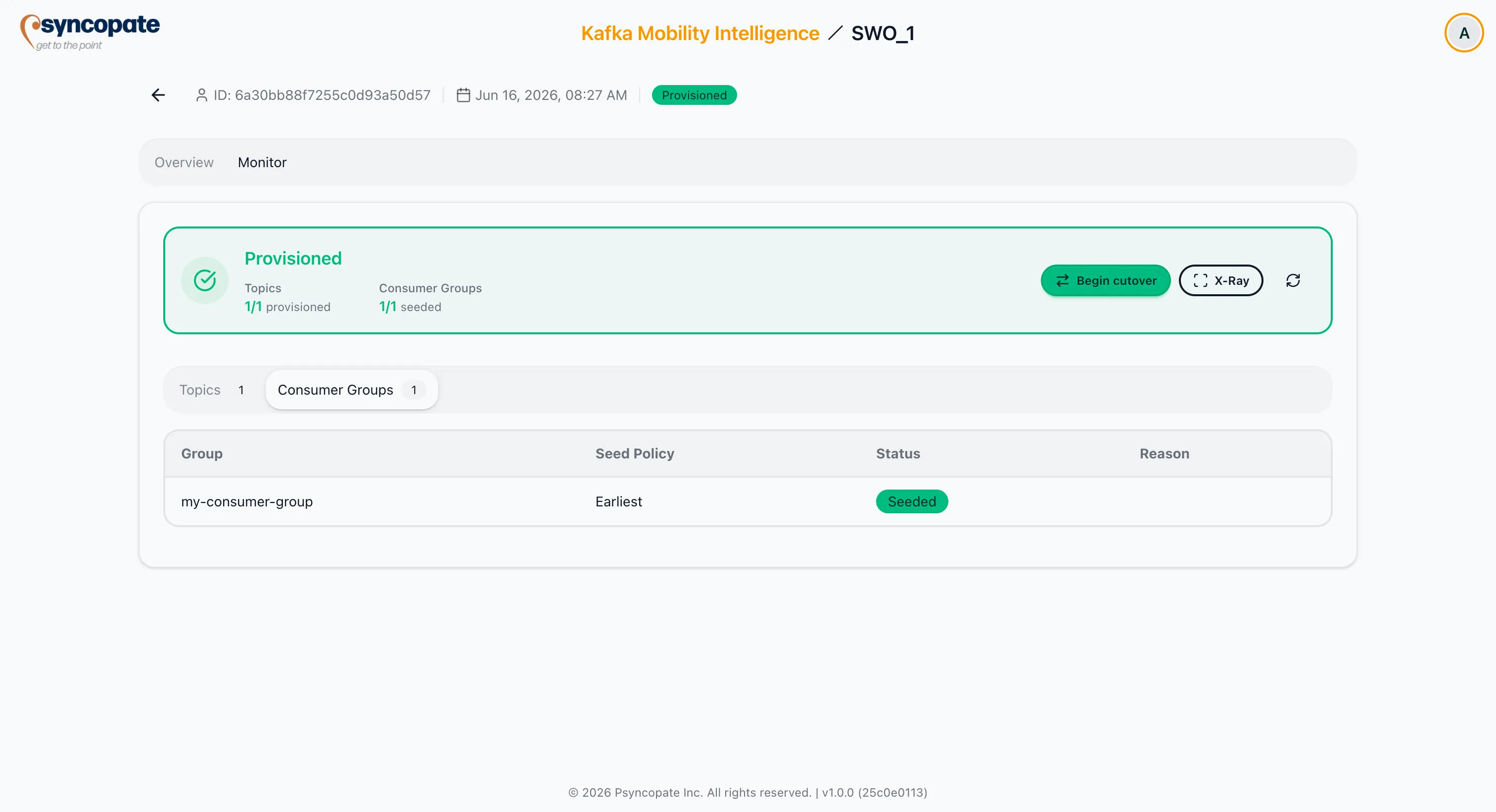
The Consumer Groups tab lists each group with its applied seed policy (Earliest or None) and seed status.
| Resource | What a row shows |
|---|---|
| Topic | Created (with applied partition count, replication factor, and configs), skipped, or failed. The Configs column links to a modal listing each config with its applied value, source value, and a provenance badge. |
| Replication factor | When the destination manages it, the row shows both the source and applied value and marks it managed (for example “source 2, applied 3, Confluent Cloud managed”). |
| ACL | Created, skipped (already present), or failed. |
| Consumer group | The seed policy that was applied — Earliest (seeded) or None (track only, reported as skipped). Seeding happens once and is not repeated on later runs. |
The Configs modal uses three provenance states:
- override — the value came from a per-topic override the user set.
- managed — Confluent Cloud enforced the value (for example replication factor).
- no badge — the config carries no provenance badge when it is the source-derived value applied as-is (neither overridden nor Confluent Cloud-managed).
A created topic with no explicitly-set source configs and no overrides shows defaults in the Configs column (it was created from broker defaults; broker-default and inherited configs are not enumerated).
A per-topic override is applied only when the topic is created; an override targeting an existing topic is ignored, and an override key the destination rejects is reported as a failed row with a readable reason, never silently dropped.
Retry and Selective Reprovision
Section titled “Retry and Selective Reprovision”After a failed run, Retry all failed reprovisions every failed row. Only failed rows are selectable for reprovision — a created row, or a row skipped because it already exists, is not selectable. When a reprovision clears all remaining failures, the badge returns to Provisioned; if failures remain, it stays Failed. Consumer groups are never part of a reprovision.
Sync Now
Section titled “Sync Now”Once the destination exists (status Provisioned, or Failed after a partial run), Sync now re-runs provisioning for topics and ACLs but does not re-seed consumer-group offsets — the Consumer Groups section is carried forward unchanged. Sync now is asynchronous and shows live progress like the initial provision.
A single Sync now also re-syncs schemas when schema provisioning is enabled on the job (it creates newly in-scope subjects and is grow-only — it never deletes a destination subject). So one Sync now covers topics, ACLs, and schemas; only consumer-group seeding is excluded.
Sync now re-applies any topic wildcard pattern against the live source, so a topic created on the source after the job was built that matches the pattern is picked up and created. Already-present topics are skipped, and the selection grows to include the newly matched topics.
Permissions and Edit Lock
Section titled “Permissions and Edit Lock”| Action | Required permission |
|---|---|
| Provision / Retry / Sync now / Reprovision | JobProvision |
| Begin cutover | JobCutover |
Each completed run is recorded in the audit log with the acting user, the job, and a per-type summary (for example “topics: 8 created, 2 skipped, 1 failed”).
Once the job reaches Provisioned, the Begin cutover action becomes available. See Beginning Cutover.