Confluent Gateway Overview
A Confluent Gateway acts as a proxy in front of your Kafka clients, a stable connection point that shields them from the complexity of switching brokers, credentials, and security settings during a migration. It’s the mechanism KMI uses to perform a zero-cut migration from a source cluster: Open Source Kafka, Amazon MSK, or an existing Confluent Platform or Confluent Cloud cluster, to Confluent Cloud. Clients keep talking to the gateway throughout the migration; the gateway itself is reconfigured in stages as the migration progresses, without clients ever needing to know.
Lifecycle States
Section titled “Lifecycle States”A gateway resource is defined across three lifecycle states. Each is a fully independent, complete configuration: its own routes, auth, secret stores, streaming domains, and workload settings, none of it inherited from another state.
Routes and auth for the initial phase, before any fencing or cutover begins, the state a newly created gateway starts configuring against the source cluster.
| Property | Value |
|---|---|
| Swap-mode route | Passthrough to source cluster; swap hasn’t happened yet |
| Fencing | Not typically used; Init is meant to run before fencing begins. The builder doesn’t prevent checking Fence this route here, and validation doesn’t warn about it either; there’s just normally no reason to. |
| SCRAM registration route | Present for SASL/SCRAM sources, to pre-register destination credentials |
| Applied by | You, manually |
Fenced
Section titled “Fenced”Config active during the migration window, while producers are fenced from the source cluster.
| Property | Value |
|---|---|
| Swap-mode route | Passthrough to source cluster, just fenced; swap still hasn’t happened |
| Fencing | Migration route should be fenced; a Fenced state with no fenced route is flagged |
| SCRAM registration route | Should be removed; flagged if left |
| Applied by | KMI, automatically during the migration |
Switchover
Section titled “Switchover”Final config once traffic is fully cut over to the destination cluster.
| Property | Value |
|---|---|
| Swap-mode route | Actually swaps: client auth, cluster auth, and secret store go live against the destination |
| Fencing | A route still fenced here is flagged; clients would stay blocked after cutover |
| Bootstrap / streaming domain | Should differ from Init’s; identical values are flagged, since cutover wouldn’t actually route anywhere new |
| Applied by | KMI, automatically during the migration |
The flagged conditions above are covered in full in Validation Reference; the swap-timing behavior is explained in Creating a Gateway.
This section covers building, deploying, and managing gateway resources. Running an actual migration through a configured gateway is initiated and executed from a migration job’s X-Ray view, and that workflow is not yet covered in this guide. Deployment Assets explains where your responsibility ends and KMI’s begins, including what to do if a state transition fails and leaves producers fenced.
Finding Your Gateways
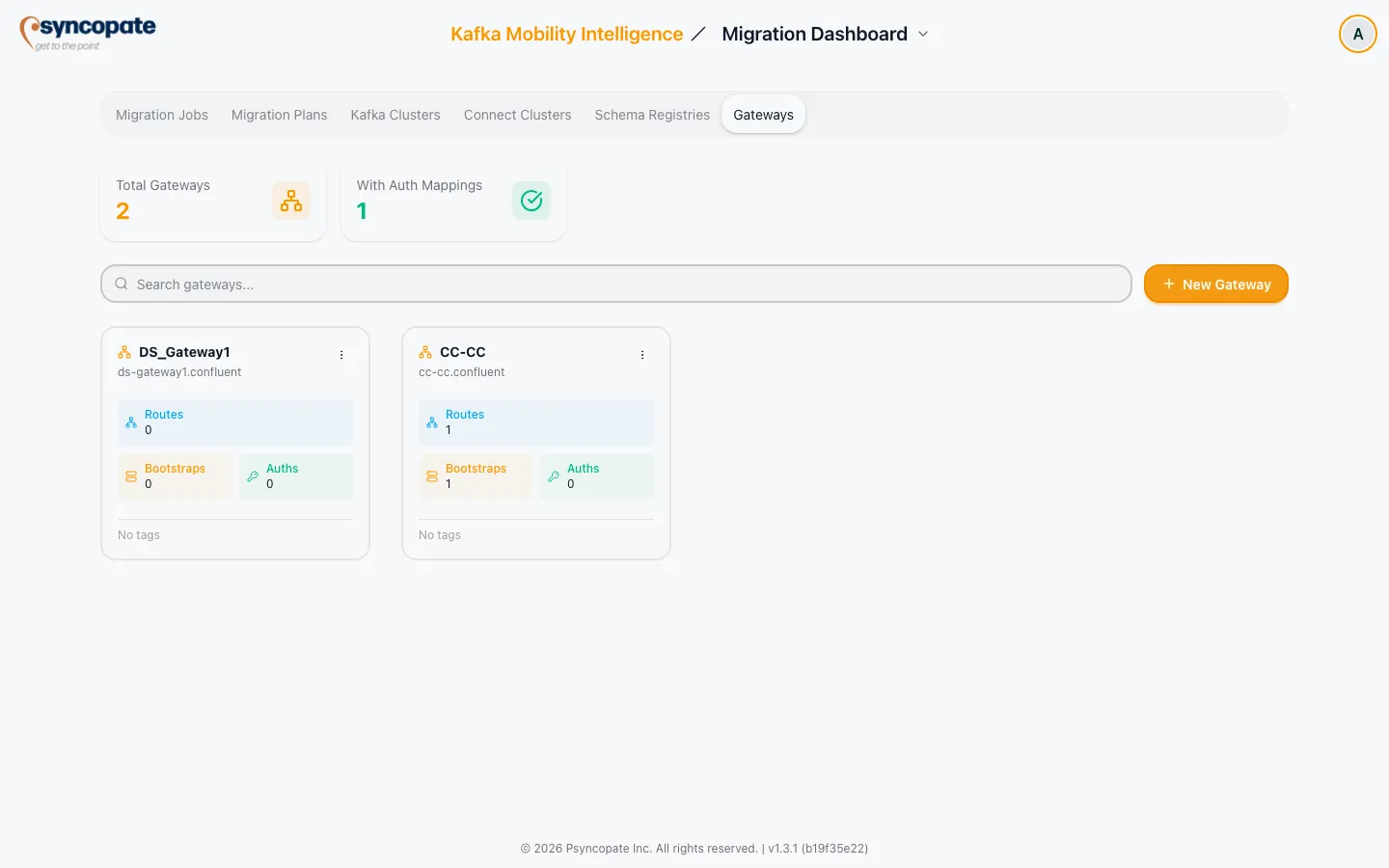
Section titled “Finding Your Gateways”Gateway resources are managed from the Gateways tab on the dashboard, one of six tabs in migration mode, alongside Migration Jobs, Migration Plans, Kafka Clusters, Connect Clusters, and Schema Registries. The Gateways tab isn’t shown at all in DR mode.
Above the card grid, two stat cards summarize Total Gateways and gateways With Auth Mappings, and a search box filters cards by alias, description, tags, or gateway name. Users with the Infrastructure Manage permission also see a + New Gateway button here (see Creating a Gateway). While gateways are loading, placeholder skeleton cards are shown in their place; with none saved yet, or none matching your search, an empty state prompts you to add your first gateway or adjust your search terms. The grid paginates once you have enough gateways to need it.
Gateway Cards
Section titled “Gateway Cards”Each saved gateway is shown as a card with:
| Element | Description |
|---|---|
| Alias | The gateway’s display name, with a network icon |
| Name / Namespace | The gateway name and Kubernetes namespace, shown as a second line |
| Stat counts | Routes, Bootstraps, and Auths, computed from the Init state config |
| Tags | The first two tags as badges, with a +N badge for any remaining tags, or “No tags” when none are set |
Clicking a card opens its detail page. Users with the Infrastructure Manage permission additionally see a kebab menu on each card with Edit, Download YAML, Duplicate, and Delete (shown in red). The menu shows “Downloading…” while a download is in progress. Users without that permission don’t see the kebab menu but can still open the read-only detail page. Edit opens the Builder Workspace; a gateway’s alias, description, and tags are set when you create it and can’t be changed afterward.