Infrastructure Settings
Infrastructure Settings configures the REST API endpoints and Cluster Link parameters required to establish replication for each link in the topology.
The step is split into two sub-steps, shown as tabs with completion counters: REST Endpoints and Link Settings.
REST Endpoints
Section titled “REST Endpoints”The REST Endpoints sub-step shows one configuration card per cluster. A completion counter in the tab label shows how many clusters have a URL configured (e.g., REST Endpoints (2/3)).
| Field | Required | Description |
|---|---|---|
| REST URL | Yes | The REST API endpoint used for Cluster Linking admin operations |
| Auth Type | Yes | Authentication method for the REST endpoint |
Auth Type options:
| Option | Description |
|---|---|
| None | No authentication |
| Bearer | Bearer token |
| Basic | Username and password |
| API Key | API key ID and secret |
| OAuth | OAuth 2.0 client credentials or password grant |
When a cluster’s REST URL is already registered in the cluster inventory, the field is pre-filled and marked Pre-filled from cluster inventory.
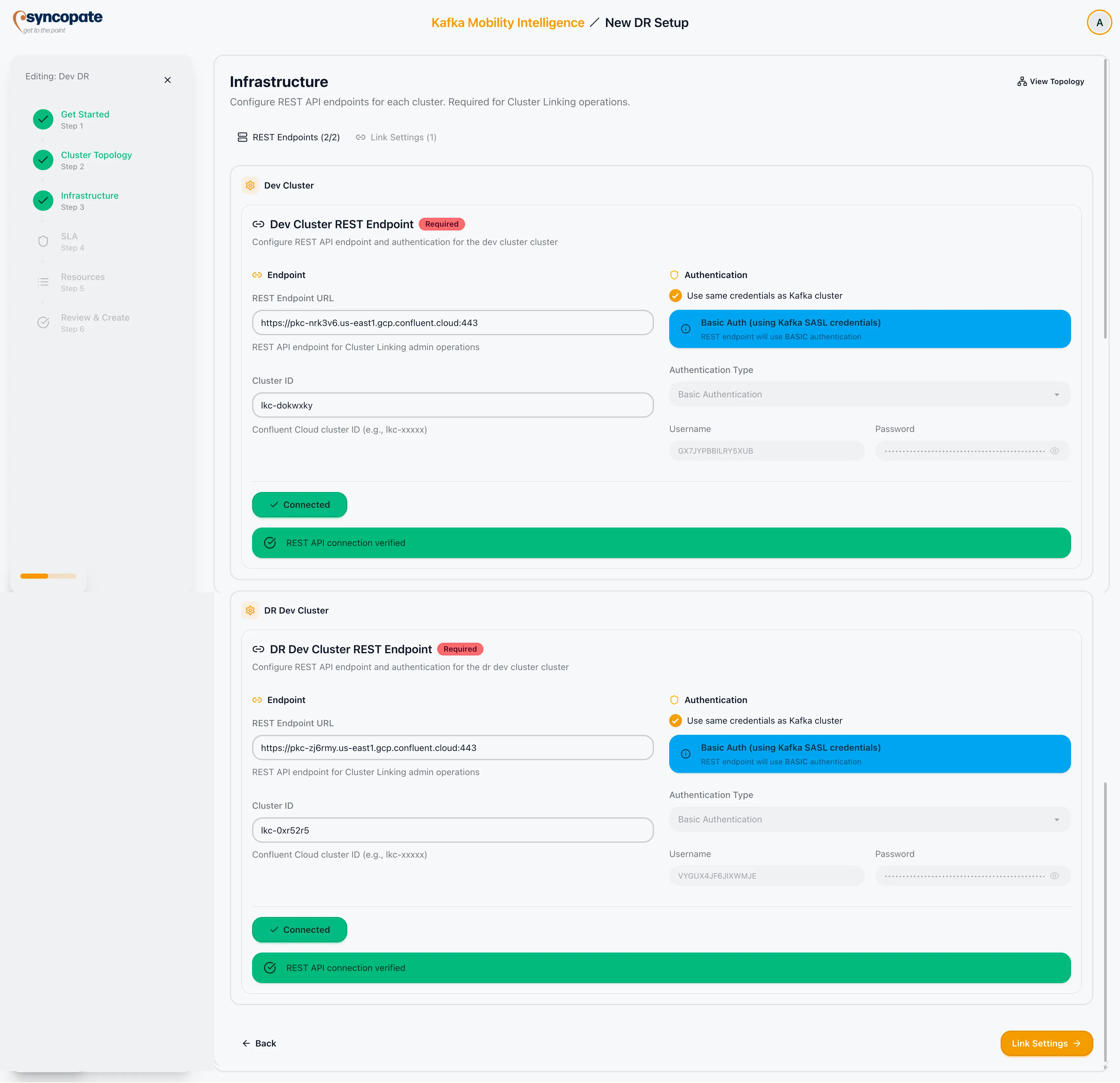
Click Continue in the REST Endpoints sub-step to advance to Link Settings.
Link Settings
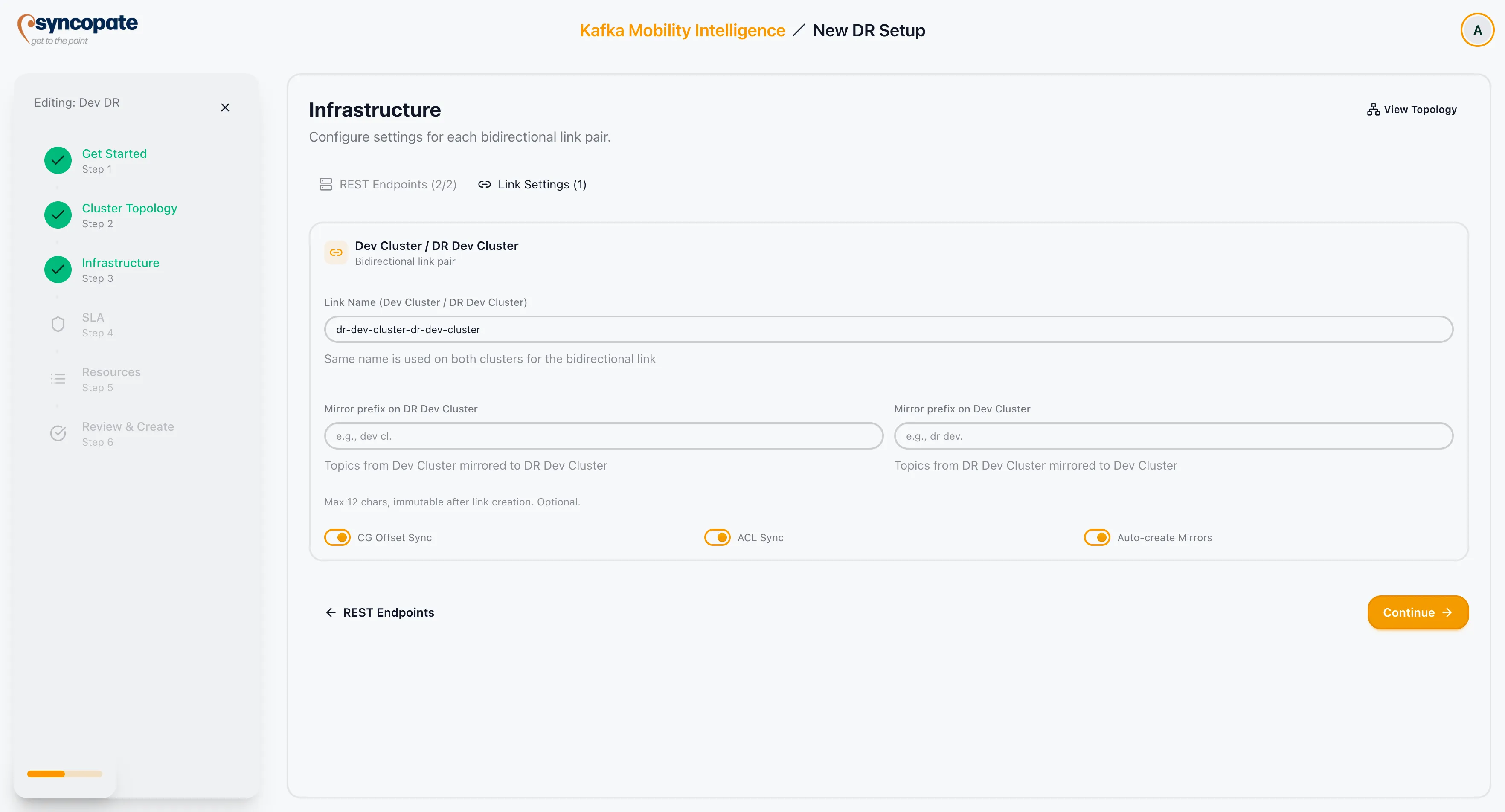
Section titled “Link Settings”The Link Settings sub-step shows one configuration card per link. A completion counter in the tab label shows the number of links (e.g., Link Settings (2)).
| Field | Required | Description |
|---|---|---|
| Link Name | Yes | Identifier for the Cluster Link. The same name is used for both directions. |
| Mirror Prefix (Forward) | No | Prefix applied to mirror topic names on the destination cluster for the forward direction. Max 12 characters. Alphanumeric, ., -, _ only. |
| Mirror Prefix (Reverse) | No | Prefix applied to mirror topic names on the source cluster for the reverse direction. Same constraints as forward prefix. |
| CG Offset Sync | No | Enables consumer-group offset sync on the cluster link itself, and is the only setting in the wizard that turns it on or off. Enabled by default. Which groups are covered comes from the per-direction consumer group selection in Resource Selection, which becomes the link’s group filter. After the setup is running, the Monitor tab’s Manage Consumer Groups sub-tab has an enable action, but it only updates KMI’s stored setting and unlocks that table. It sends nothing to the cluster link, so it does not by itself restore offset sync. Sync reaches the link when the link is provisioned, or as a side effect of adding the first consumer group, which is what that panel’s own note describes. |
| ACL Sync | No | Synchronises ACLs across the link. Enabled by default. |
| Auto-create Mirrors | No | Automatically creates mirror topics on the destination when new topics appear on the source. Enabled by default. |
| Synced Topic Configs | No | Per-link allowlist of topic configs Cluster Linking syncs to mirror topics (topic.config.sync.include). 8 of 9 standard configs are selected by default; max.message.bytes, cleanup.policy, and message.timestamp.type are locked and always synced. |
Synced Topic Configs
Section titled “Synced Topic Configs”message.timestamp.difference.max.ms was removed in Confluent Platform 8.0.0 (replaced by message.timestamp.before.max.ms and message.timestamp.after.max.ms). If a source topic carries this config and Cluster Linking syncs it onto a mirror topic on a CP 8.0.0+ destination, the destination rejects mirror-topic creation with Unknown topic config name: message.timestamp.difference.max.ms, so it’s deselected by default.
If your destination cluster is CP 7.x or earlier, or otherwise supports this config, add it back via the dropdown below the tag list. max.message.bytes, cleanup.policy, and message.timestamp.type are always synced and can’t be deselected in the wizard.
Completing Infrastructure Settings
Section titled “Completing Infrastructure Settings”-
Configure a REST URL and auth type for every cluster in the REST Endpoints sub-step.
-
Click Continue to move to Link Settings.
-
Set the link name, prefixes, and toggle options for each link.
-
Resolve any ACL Sync and prefix conflicts.
-
Click Continue to save and advance to SLA and Failover Policy.