X-Ray
X-Ray provides deep visibility into migration progress, data flow patterns, and actionable insights. It augments the standard Monitor tab with advanced visualizations and step-by-step guidance for completing the migration.
Timeline
Section titled “Timeline”The timeline tracks the migration through a series of ordered stages. The number and names of stages vary by replication tool:
MM2 / Replicator (default, 5 steps):
- Start Migration: Migration job created and replication initiated
- Sync CG Offsets: Consumer group offsets are being synchronized
- Cutover Consumers: Consumer groups redirected to the destination cluster
- Sync Topic Offsets: Topic data replication in progress
- Cutover Producers: Producers redirected to the destination cluster
Cluster Link (7 steps):
- Start Migration
- Sync CG Offsets: Wait until all selected consumer groups reach In Sync status
- Cutover Consumers: Redirect consumer groups to the destination cluster
- Exclude CG Offset Sync: Exclude consumer groups from offset synchronization
- Sync Topic Offsets
- Promote Topics: Convert mirror topics to regular topics on the destination
- Cutover Producers
Orbit (6 steps):
- Start Migration
- Sync CG Offsets
- Cutover Consumers
- Sync Topic Offsets
- Promote Topics: Convert topics on the destination
- Cutover Producers
When all steps are complete, the timeline shows a Done state (this is not a separate step).
Each stage displays a visual indicator: green checkmark for completed stages, yellow for the currently active stage, and grey for pending stages.
Strategy
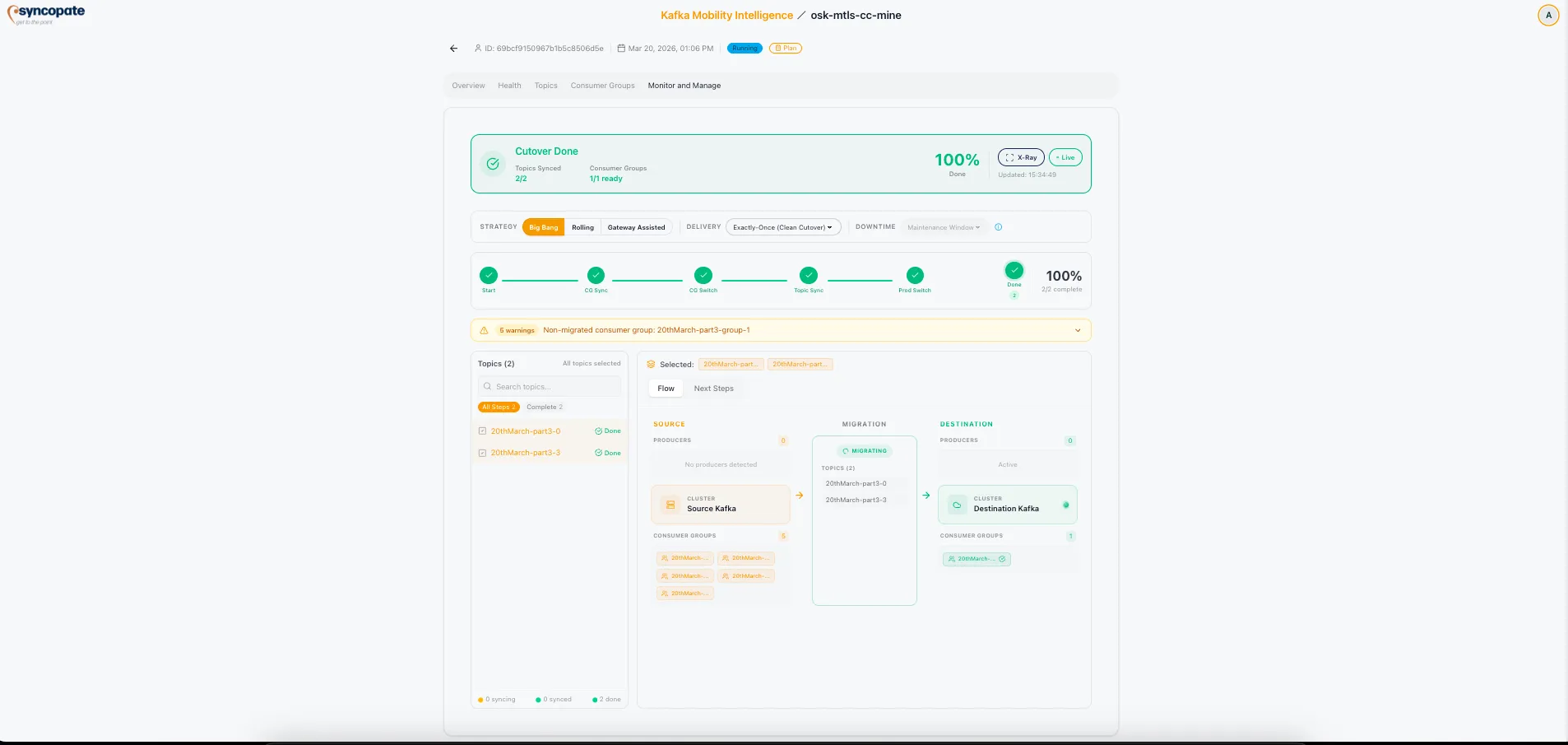
Section titled “Strategy”X-Ray displays the selected migration strategy and its characteristics.
| Strategy | Description | Risk Level | Duration |
|---|---|---|---|
| Big Bang | All components migrated at once | Higher risk | Faster |
| Rolling | Components migrated in phased waves | Reduced risk | Longer |
| Gateway Assisted | Intermediate layer handles routing, minimal client changes | Lowest risk | Variable |
Delivery Type
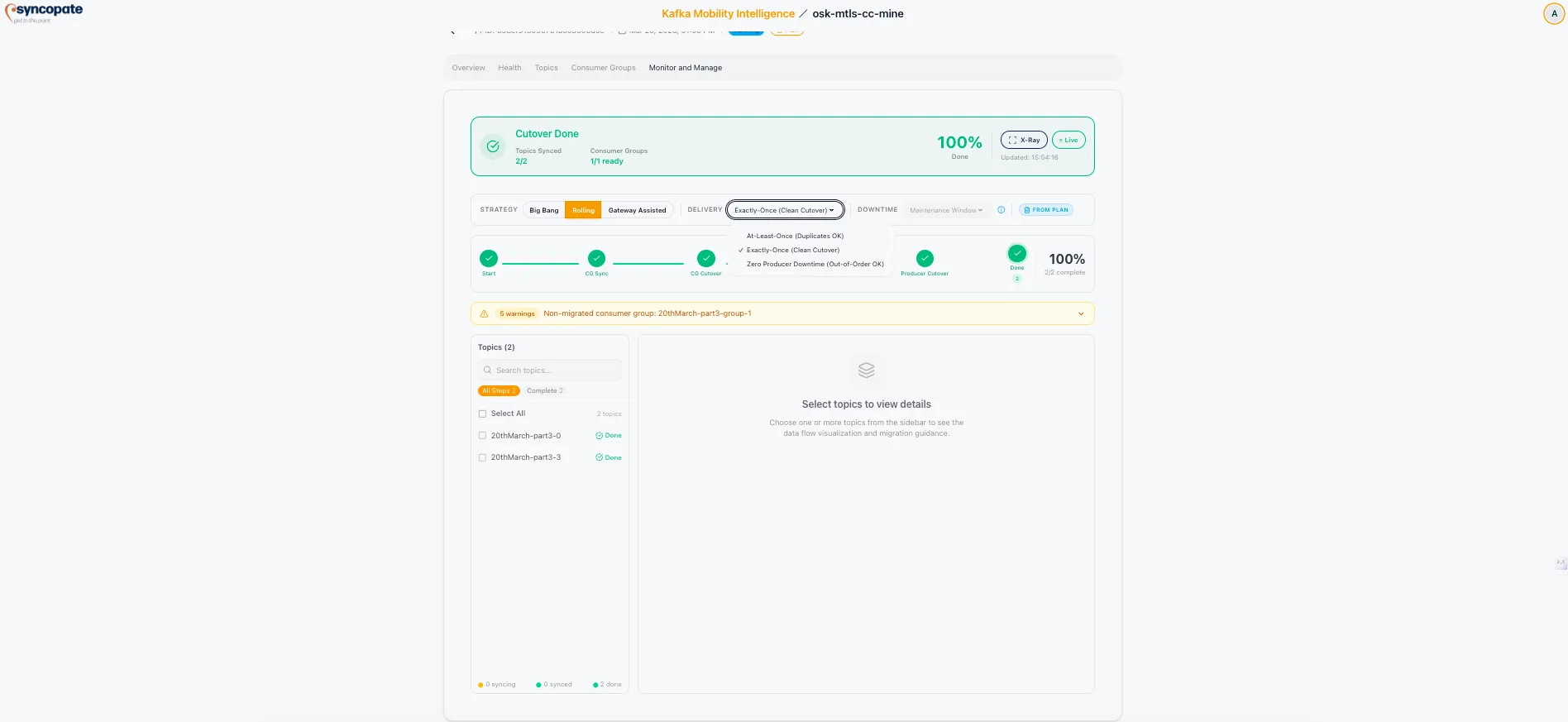
Section titled “Delivery Type”The delivery type defines the data guarantees during replication.
| Delivery Type | Description |
|---|---|
| Exactly Once | No data loss or duplication; requires idempotent producers on the source |
| At-Least-Once | No data loss, but possible duplicate messages on the destination |
| Zero Producer Downtime | Producers experience no interruption during cutover; mirroring continues until after producer switch-over |
Error and Warning Alerts
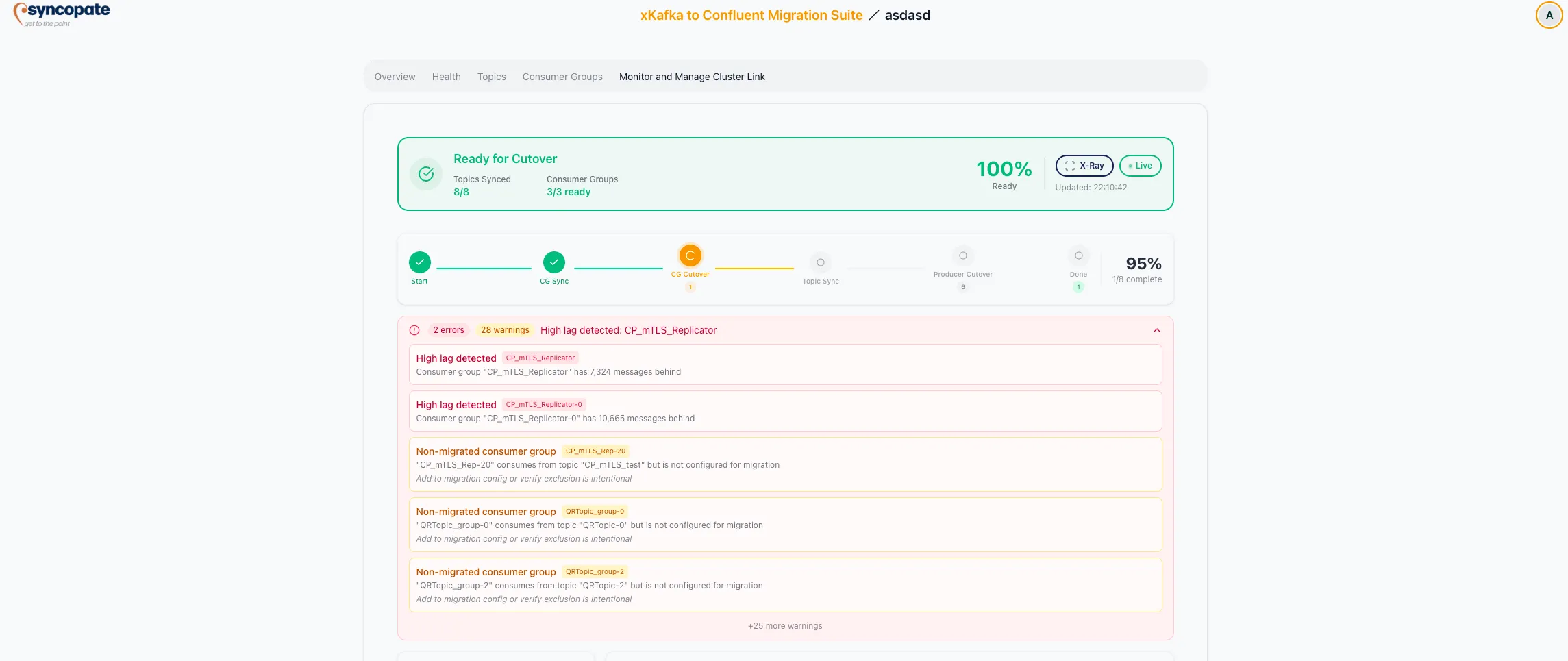
Section titled “Error and Warning Alerts”X-Ray surfaces errors and warnings that require attention during the migration.
| Severity | Indicator | Impact |
|---|---|---|
| Error | Red | Blocking: requires resolution before cutover can proceed |
| Warning | Yellow | Non-blocking: should be reviewed but does not prevent cutover |
Alert Types
Section titled “Alert Types”| Alert | Key | Description |
|---|---|---|
| High Lag Detected | high-lag | Replication lag exceeds the configured threshold |
| Non-migrated Consumer Group | non-configured-cg | Consumer group consumes from migrated topics but is not configured for migration |
| Sync Stalled | sync-stalled | Topic has 0 synced partitions while others have progressed |
| Partition Mismatch | partition-mismatch | Partition count differs between source and destination for a topic |
| Phantom Lag | phantom-lag | Offset gap caused by retention policy deletion on the source cluster |
Each alert type includes a severity count showing the number of affected components.
Data Flow Visualization
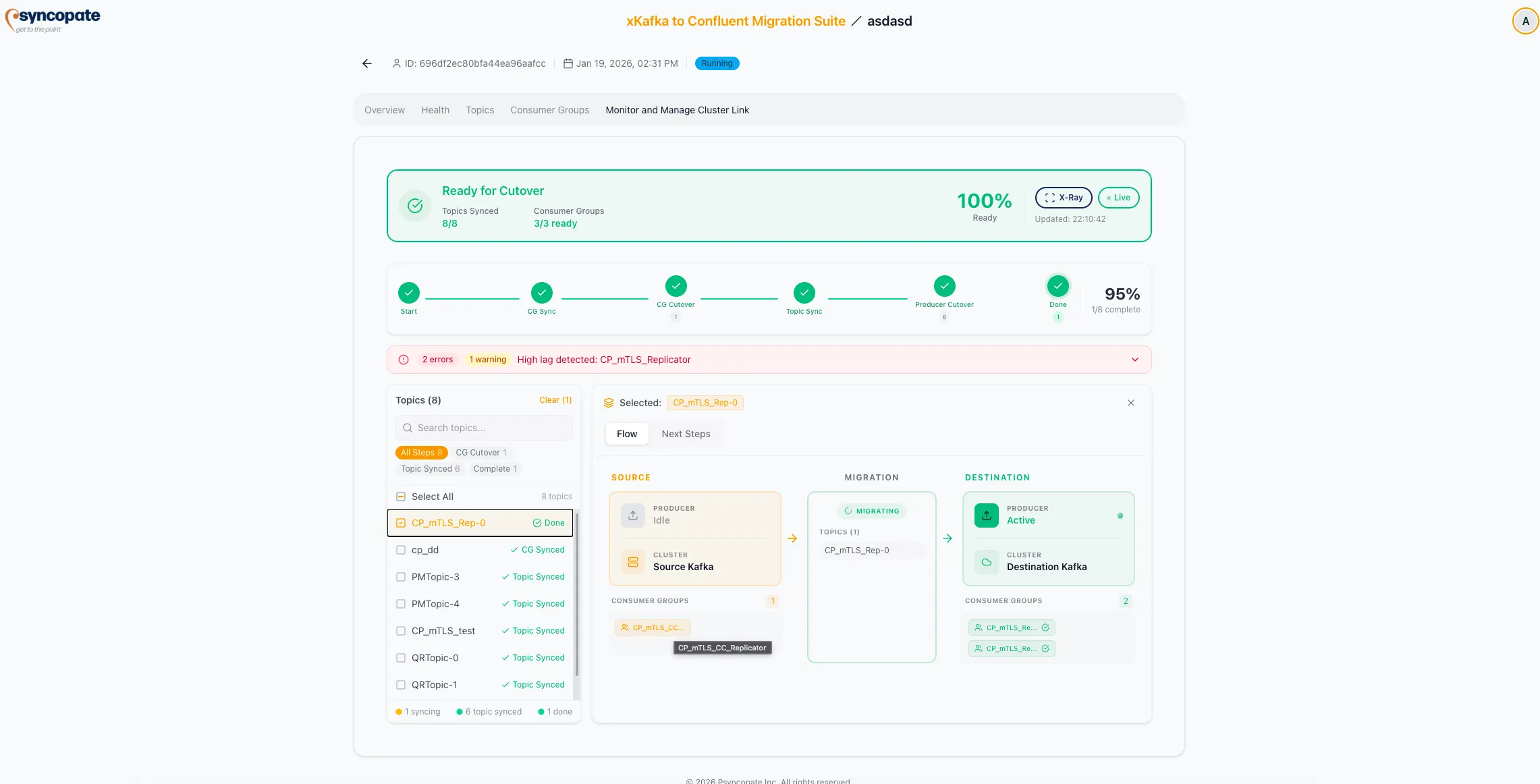
Section titled “Data Flow Visualization”An interactive diagram shows the end-to-end data flow:
| Component | Details Shown |
|---|---|
| Source | Producer status, cluster name, active producers |
| Migration | Status badge, topics in scope, consumer groups in scope |
| Destination | Producer status, cluster name, consumer groups |
Directional arrows indicate data movement between components. The status badge on the migration component reflects the overall migration state.
Topic Sidebar
Section titled “Topic Sidebar”The topic sidebar provides quick access to individual topic statuses organized by migration phase:
Filter Categories (dynamic per replication tool, includes each migration step):
- All Steps: Complete list of topics regardless of phase
- Start: Topics in the initial migration phase
- CG Sync: Topics where consumer group offsets are syncing
- CG Cutover: Topics where consumer groups have been cut over
- Topic Sync: Topics where data replication is in progress
- Producer Cutover: Topics where producers have been redirected
- Complete: Topics where all migration steps are finished
Additional categories may appear depending on the replication tool (e.g., Exclude CG Offset Sync, Promote Topics for Cluster Link).
Color Indicators:
- Yellow: Topic is actively syncing
- Green: Topic is synced and ready
- Completed badge: All steps done for this topic
Select individual topics or use the “select all” option to filter the main view.
Next Steps Guidance
Section titled “Next Steps Guidance”X-Ray provides contextual guidance based on the current migration phase.
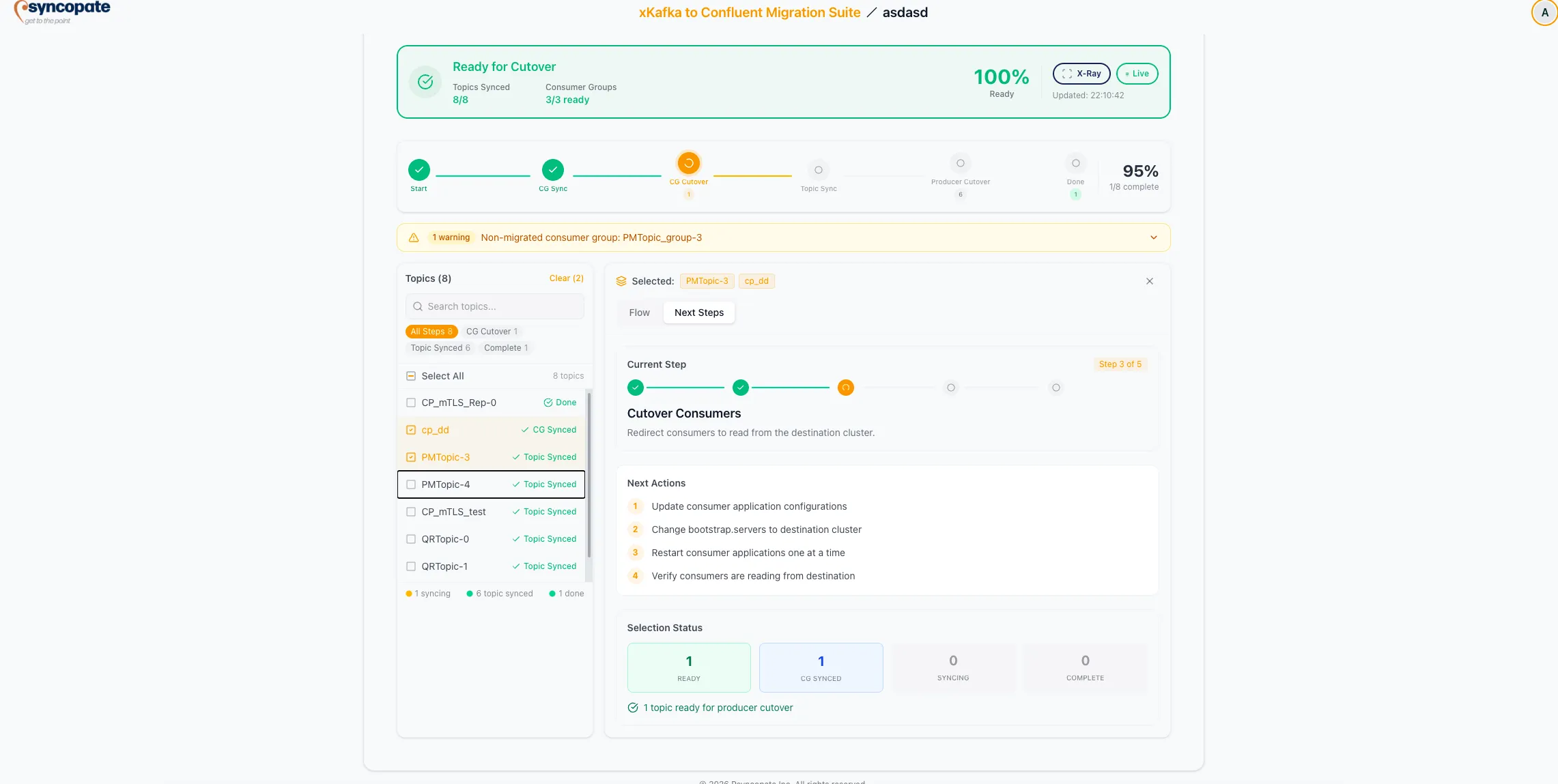
Active Phase Display: Shows the current step (e.g., “Step 3 of 5: Cutover Consumers”) with a clear description of what needs to happen next.
Ordered Checklist for the active phase:
- Update consumer configurations with destination cluster details
- Change bootstrap servers in consumer applications
- Restart consumer applications
- Verify consumer readiness on the destination cluster
Selection Status Tracker: Aggregate counts of topic readiness across all phases:
| Counter | Description |
|---|---|
| Total Selected | Total number of topics selected for migration |
| Ready for Cutover | Topics prepared for the current cutover phase |
| CG Synced | Topics with consumer group offsets synchronized |
| Syncing | Topics actively replicating |
| Complete | Topics that have finished all migration steps |