Start, Pause, Decommission, and Delete
Lifecycle action buttons appear in the Overview tab and control the operational state of a DR setup. Which buttons are visible depends on the current DR status.
Action Availability
Section titled “Action Availability”| Action | Available When DR status Is |
|---|---|
| Start | Configured, Paused, Failed |
| Pause | Replicating, Degraded |
| Edit | Draft, Configured, Failed |
| Failover | Planned or Emergency: Replicating, Degraded, Paused; Emergency only: Failed (accessed via Monitor -> X-Ray) |
| Failback | Failed-Over (accessed via Monitor -> X-Ray) |
| Decommission | Paused, Failed-Over, Failed |
| Delete | DR status in Configured / Decommissioned |
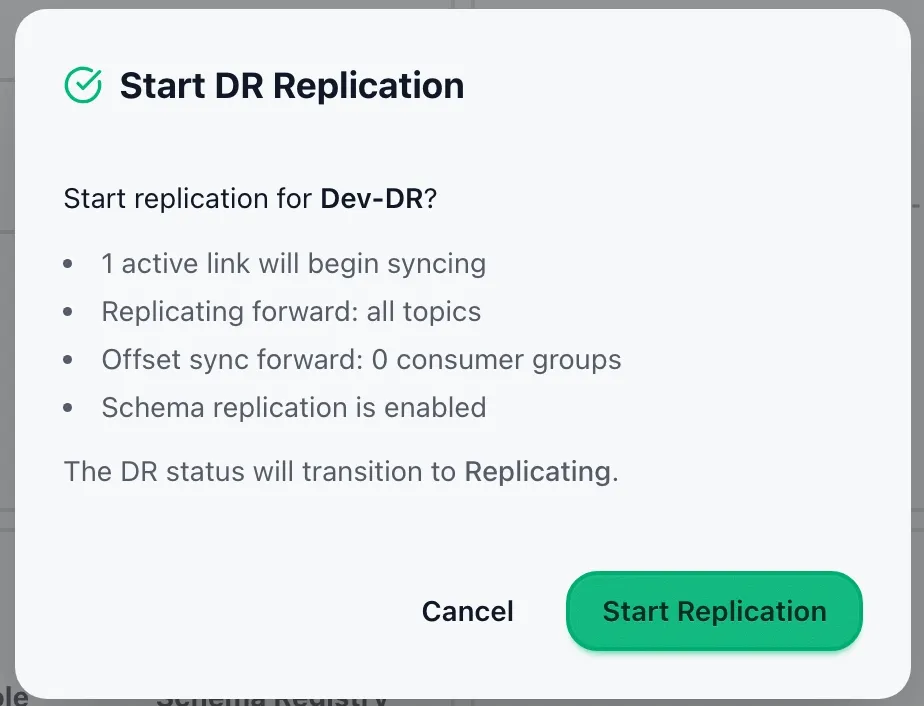
Clicking Start opens a confirmation modal before replication begins.
Start modal content:
- Number of active links that will begin syncing
- Per-direction resource summary:
- Topic count or pattern count per direction
- Consumer group count per direction (if offset sync enabled)
- Schema replication indicator (if schema replication enabled)
- Status transition note: the DR status will transition to Replicating
If some links fail to start while others succeed, the modal reports a partial start (succeeded count and failed count). The setup still transitions to Replicating for the links that succeeded.
Clicking Pause opens a confirmation modal.
Pause modal content:
- All active links will stop and schema exporters will pause
- Replication can be resumed with no data loss on either cluster
The DR status transitions to Paused after confirmation. Use Start to resume.
Decommission
Section titled “Decommission”Clicking Decommission opens a confirmation modal.
Decommission modal content:
- All active Cluster Links and collectors will be stopped
- The setup will be marked as Decommissioned
- The setup and its history remain viewable but no further operations will be possible
The DR status transitions to Decommissioned after confirmation.
Delete
Section titled “Delete”Clicking Delete opens a confirmation modal. After confirmation, the setup and all associated events are permanently deleted.
Delete is only available when DR status is Configured or Decommissioned. It is not available for running, paused, or in-progress setups.