Deployment Assets
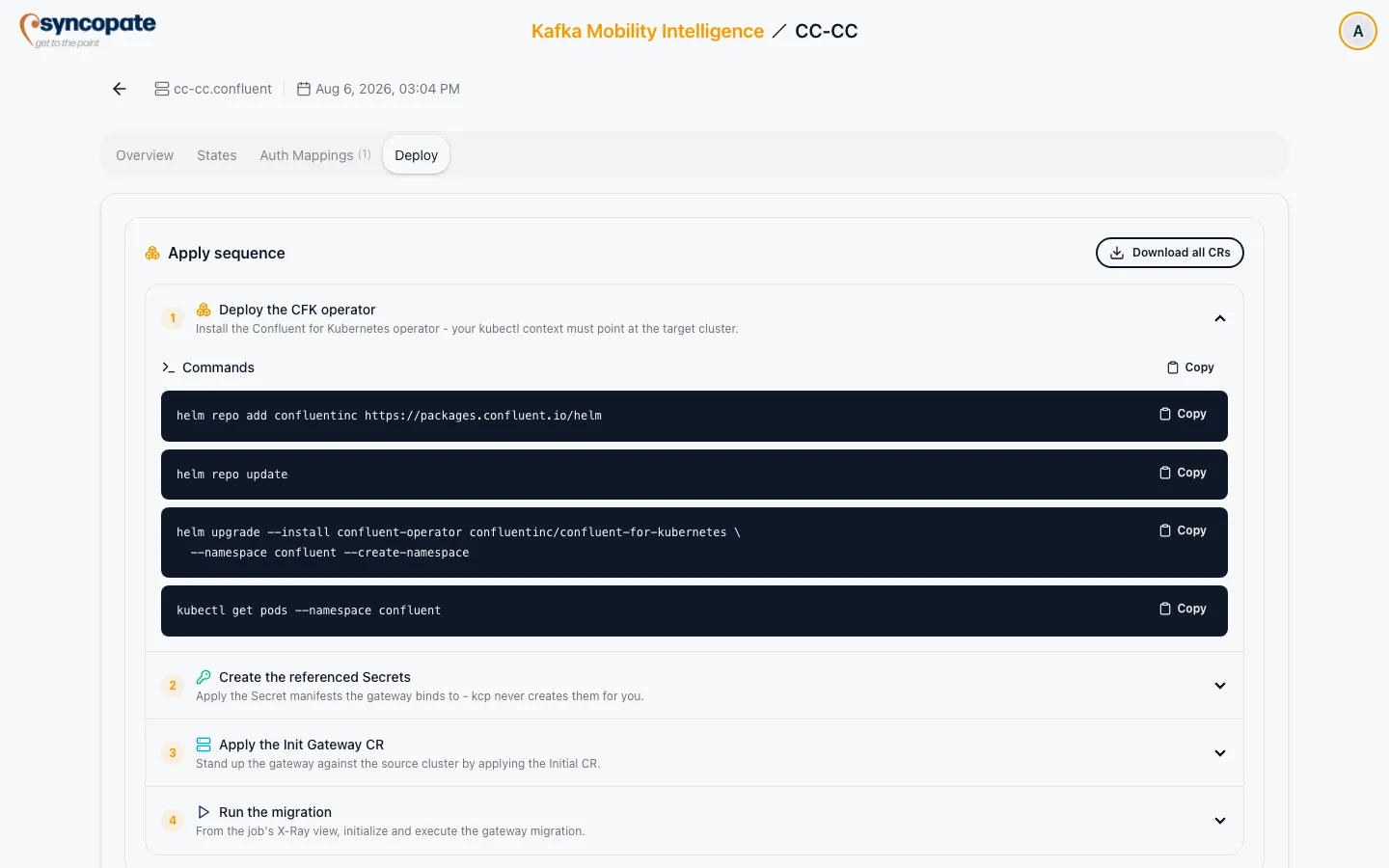
Once a gateway is configured, the Deploy tab renders the assets needed to actually deploy it. This page covers the apply sequence itself, who does what, and in what order.
-
Deploy the CFK operator.
Install the Confluent for Kubernetes operator into the gateway’s namespace, then verify the operator pods are running. Your
kubectlcontext must already point at the target cluster. For CFK and Gateway version compatibility, supported Kafka protocol versions, and licensing, see Confluent’s Gateway deployment documentation. This page covers the KMI side of the sequence, not the operator’s own requirements.By default, the generated CR’s application image is
confluentinc/cpc-gateway:latest, which isn’t pinned to a specific version, so a redeploy can pick up a newer image without you choosing to. Set a specific tag in the builder’s state-level Image field if you need reproducible deployments. -
Create the referenced Secrets.
Apply the Secret manifests the gateway binds to. KMI never creates these for you. Each Secret is shown with the values you still need to fill in, and a
kubectl applycommand. Credential values are masked in the preview for safety; the copy button carries the real decrypted value. This isn’t limited to secret-store Secrets: a passthrough gateway with no secret store at all can still need a listener TLS certificate or a bootstrap trust store, and those get their own Secret here too (see Secret Store Contents below). There’s nothing to create at this step only if the gateway references no Secrets whatsoever. -
Apply the Init Gateway CR yourself.
Apply the Initial CR to stand the gateway up against the source cluster, then confirm the rollout completes.
-
Run the migration.
From here on KMI is responsible: initialize and execute the gateway migration from the job’s X-Ray view, and KMI applies the Fenced and Switchover CRs for you as the migration progresses through those phases. Don’t apply either one manually. The Deploy tab’s own copy still names this automation
kcp. That wording is stale and should be read as KMI: KMI applies these two CRs itself, withkubectlagainst the same namespace.
Responsibility Summary
Section titled “Responsibility Summary”| CR / Asset | Who applies it |
|---|---|
| Secrets | You, before step 3 |
| Init | You, manually |
| Fenced | KMI, automatically during migration |
| Switchover | KMI, automatically during migration |
Secret Store Contents
Section titled “Secret Store Contents”What step 2 generates for a secret store depends on its provider:
- File: two Secrets: a credentials Secret (a flat map from source principal to destination credential) and a config Secret (the path where the gateway expects that map to be mounted).
- Vault: one config Secret with the gateway’s Vault connection settings (address, auth token, prefix path, separator). The credential mappings themselves live in Vault, not Kubernetes: you create them directly at the store’s prefix path.
- AWS Secrets Manager / Azure Key Vault: one config Secret with the provider’s connection settings. As with Vault, the credential mappings live in the external store, not Kubernetes.
Beyond the secret-store Secrets, step 2 also covers any JAAS, TLS certificate, or truststore Secrets referenced by the gateway’s auth or route blocks: each rendered with its own sample manifest and kubectl command alongside the secret-store ones.
Downloading State CRs
Section titled “Downloading State CRs”On the Deploy tab itself, each state’s CR (shown in the apply-sequence steps above) has a Copy button, not an individual download, the only download action here is Download all CRs, which gets all three states at once. To download a single state’s CR by itself, use the Overview tab’s Download YAML action instead (see Gateway Detail). Either way, every state, including one with no blocks configured, produces real YAML: an unconfigured state emits a default skeleton CR rather than being blocked or hidden. Downloads here are blocked by the same validation-error check as the builder’s Download button.