The Cutover Cockpit
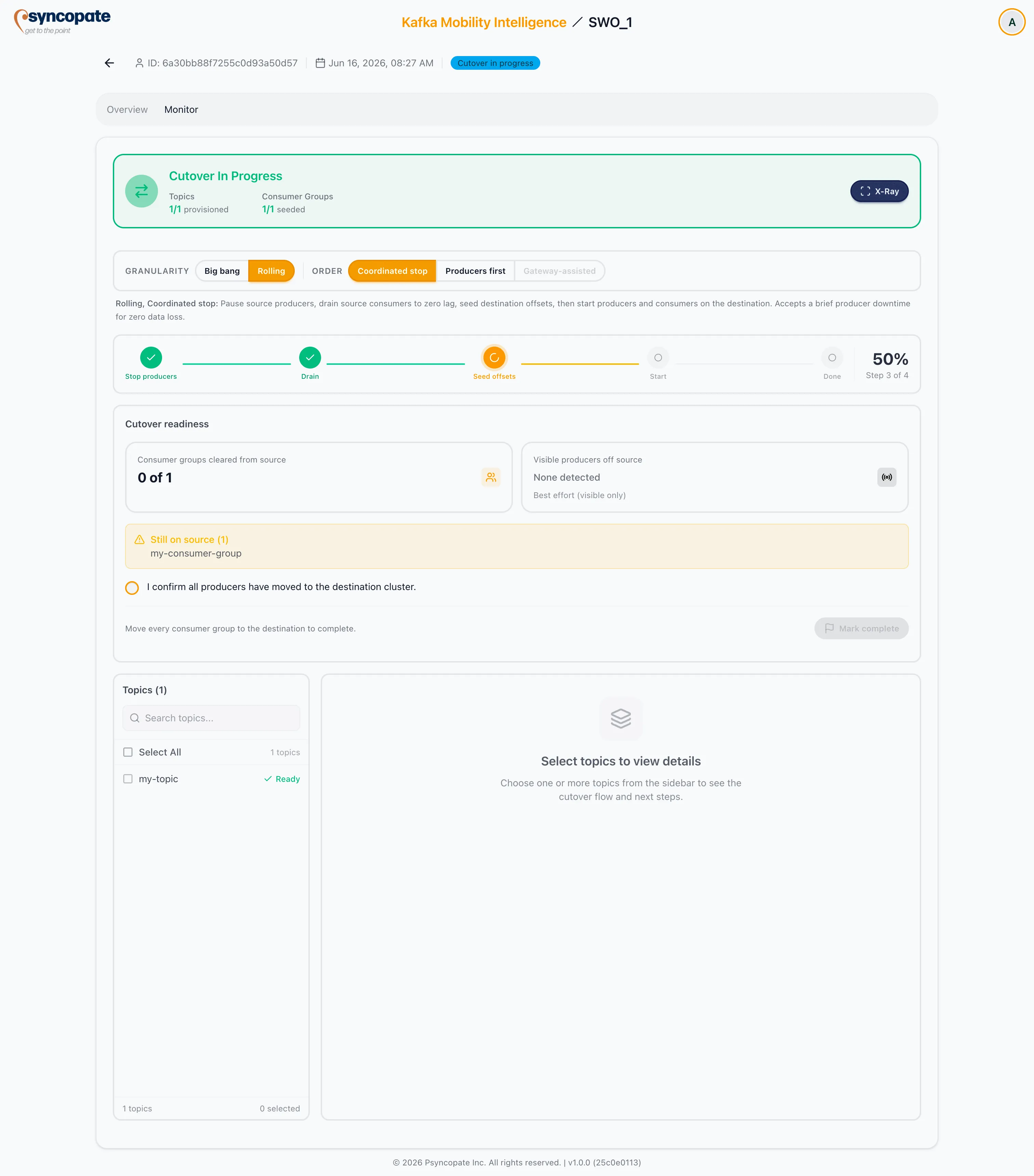
The cutover cockpit is the orchestration view you work the cutover from. It mirrors the replication X-Ray layout, reframed for switchover, and combines the cutover-model selector, a horizontal steps strip, a readiness and completion panel, and a topic sidebar paired with a tabbed detail panel.
Opening the Cockpit (X-Ray Toggle)
Section titled “Opening the Cockpit (X-Ray Toggle)”The cockpit is not a separate tab. It is a view-toggle in the monitor’s sticky status header — a Scan icon labelled “X-Ray” that swaps the whole monitor between the provision-result tables (the ledger) and the cutover cockpit (the orchestration view).
- For a switchover job the toggle defaults off (the monitor opens on the provision tables) and auto-switches on the moment the job enters Cutover in progress, so the cockpit fronts the cutover. You can toggle back to the tables at any time.
- The button renders solid while the cockpit is open and outlined while the tables show.
- After completion the cockpit stays available and is the default view: in the same session the flow freezes at the final observed state and a completion banner replaces the readiness panel. A completed job opened fresh has no live snapshot left (the collector stops at completion), so the flow panel explains that tracking ended and the provision tables keep the record.
Layout
Section titled “Layout”- Cutover model selector — the granularity and order axes (locked once the job Completes).
- Steps strip — the ordered cutover steps for the chosen order, with the live current step highlighted.
- Cutover readiness panel — the consumer roll-up, best-effort producer roll-up, and the Mark complete gate (see Completing the Switchover).
- Topic sidebar — select topics to drive the detail panel. Locked to all topics in big-bang granularity; selectable per wave in rolling.
- Detail panel — two tabs: Flow (live data flow) and Next Steps (guided actions).
Flow Tab
Section titled “Flow Tab”The Flow tab shows source and destination clusters with the selected topics between them. Per side it lists the live producer apps and consumer apps (with client IDs and hosts), and a source lag drain indicator. A status badge reads On source, Partial, On destination, or idle, derived from where active producers are running. The data comes from the same stream as the Topics and Consumer Groups monitor tabs, so the views never disagree.
The source lag shown per group is the true source-cluster consumer lag (source latest minus committed) — not a replication lag. A switchover has no replication, so unlike a replication migration job there is no replication lag here; this value is what the producers-first drain gate watches. The drain indicator stays live even for an idle or cleared group, where a non-zero value represents messages that group is abandoning on the source (tinted as a warning) — but the drain gate itself ignores an idle group’s stale committed lag, since no live consumer is draining it.
A producer is judged active or stopped by the recency of its last produce timestamp, not by mere presence — a stopped idempotent producer lingers in broker state until expiry. On a Confluent Cloud source detected via the Metrics API, activity is judged over the metrics lookback window plus ingest delay, so a recently stopped producer can read active for a few minutes; stopped consumers clear within one scrape (membership is live). The view never claims “all producers off source” as a verified fact, because non-idempotent producers can be invisible.
Live Cutover Columns on the Monitor Tabs
Section titled “Live Cutover Columns on the Monitor Tabs”The cockpit and the static monitor tabs are the same source of truth in two renderers — they read the same live cutover data through one shared hook, so they never disagree. Toggling X-Ray off returns you to the tables, which gain live columns during cutover:
- Topics tab — a live producer cutover column alongside the static provision result: per topic, active source vs destination producers (best effort, labelled).
- Consumer Groups tab — a live consumer cutover column alongside the static seed result: per group, source vs destination members, client IDs, and the source-lag drain indicator (robust).
- ACLs tab — remains static (provision result only); an ACL does not move at runtime.
Status badges add the cutover vocabulary (on-source, partial, on-dest) on top of the provision vocabulary (created, skipped, failed).
Next Steps Tab
Section titled “Next Steps Tab”The Next Steps tab follows the live step: a Current Step card with a numbered Next Actions list, plus the full ordered cutover-steps overview for the chosen order. Before cutover it presents the first step as upcoming.
Guided Steps by Order
Section titled “Guided Steps by Order”Coordinated stop accepts a brief producer downtime for zero data loss.
-
Stop source producers — pause every producer writing to the source so no new records land while you switch. Confirm produce traffic to the source has dropped to zero.
-
Drain source consumers — let source consumers keep reading until their lag reaches zero, so no in-flight records are missed. Confirm every consumer group has fully drained.
-
Seed destination offsets — verify the destination consumer-group start offsets are seeded so consumers resume where they left off. Resolve any group that failed to seed before continuing.
-
Start on destination — repoint producers and consumers at the destination bootstrap servers and resume them. Confirm produce and consume traffic is healthy on the destination.
Producers first achieves zero producer downtime, with transient consumer lag while the source tail drains.
-
Cut producers — repoint producers at the destination bootstrap servers first. Confirm new records are landing on the destination topics.
-
Drain source tail — leave existing consumers reading the source until the remaining source lag reaches zero. Watch the source drain indicator.
-
Cut consumers — once source consumer lag is zero, repoint consumers at the destination and resume them. Confirm consume traffic is healthy on the destination.
When the steps are worked through, finish on the completion gate.