X-Ray Guided Operations
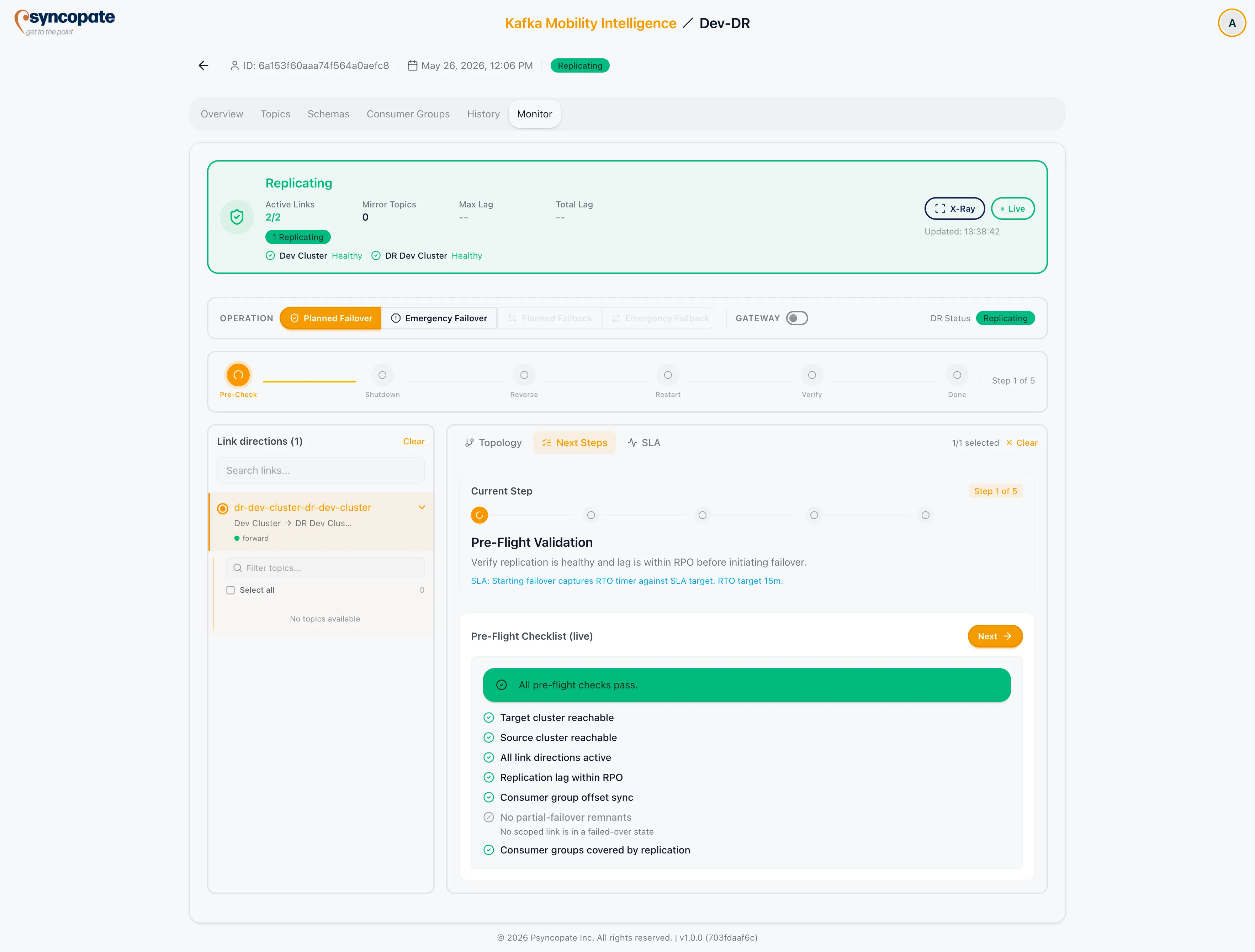
X-Ray is a guided operations panel inside the Monitor tab that walks you through failover and failback with step-by-step instructions, pre-flight checks, and live lag data.
Activating X-Ray
Section titled “Activating X-Ray”Click the X-Ray toggle in the Monitor tab status header. The main Monitor view is replaced by the X-Ray panel.
X-Ray is available when DR status is Replicating, Paused, Degraded, Failover-In-Progress, Failed-Over, or Failback-In-Progress.
Operation Modes
Section titled “Operation Modes”Select an operation mode from the dropdown at the top of the X-Ray panel. Available modes depend on the current DR status:
| Mode | Available When | Description |
|---|---|---|
| Planned Failover | Replicating, Degraded, Paused | Controlled cutover with pre-flight checks and operator acknowledgements |
| Emergency Failover | Replicating, Degraded, Paused, Failed | Immediate cutover without pre-check gate; accepts potential data loss |
| Planned Failback | Failed-Over (after a planned failover) | Controlled return to original primary |
| Emergency Failback | Failed-Over (after an emergency failover); Failed | Immediate return requiring truncate and restore |
After a failover completes, only the matching failback rail is available: planned failover -> planned failback only; emergency failover -> emergency failback only.
Step Rail
Section titled “Step Rail”Each mode executes an ordered sequence of steps. The current step is highlighted in the rail.
Planned Failover steps: Pre-Flight Checks -> Shutdown Producers & Consumers -> Reverse and Start -> Restart Producers & Consumers -> Verify Traffic
Emergency Failover steps: Assess Damage -> Shutdown Producers & Consumers -> Failover Mirrors (Immediate) -> Restart Producers & Consumers -> Verify Traffic
Planned Failback steps: Pre-Flight Checks -> Shutdown Producers & Consumers -> Reverse and Start -> Restart Producers & Consumers -> Verify Traffic
Emergency Failback steps: Assess Damage -> Shutdown Producers & Consumers -> Truncate and Restore -> Reverse and Start -> Restart Producers & Consumers -> Verify Traffic
Guidance View
Section titled “Guidance View”Each step shows:
- A description of what the step does
- Specific action items for the operator
- A primary CTA button that executes the step or records an attestation
CTA buttons are disabled until the conditions for the current step are met. For operator-attestation steps (Shutdown, Restart, Verify Traffic), the button records that the operator has completed the manual action.
Warnings Strip
Section titled “Warnings Strip”An alert strip above the step rail shows active X-Ray warnings, sorted by severity (error, then warning). A summary badge counts them as “N critical” and “N warnings”. The titles below are the ones the strip displays:
| Warning | Severity | Meaning |
|---|---|---|
| Target cluster unreachable | Error | The target cluster is not responding to cluster-level probes |
| Target cluster is degraded | Warning | The target cluster is reachable but degraded |
| Source cluster unreachable | Error | The source cluster is not responding to cluster-level probes |
| Source cluster unavailable | Error | A link reports its source cluster as unreachable. This is link-derived, so it can appear alongside the cluster-level warning above. It also fires whenever either direction is in a Failed state, with no source-reachability signal involved, so read it together with the Link direction failed row rather than as proof the source is down |
| Critical RPO breach | Error | Replication lag crossed the critical RPO threshold |
| RPO warning threshold exceeded | Warning | Replication lag crossed the warning RPO threshold |
| RTO breach: cluster downtime exceeds target | Error / Warning | A cluster has been down longer than its RTO target. Severity follows the breach level |
| Approaching RTO target | Warning | An in-progress failover or failback has passed 75% of the RTO target |
| RTO target exceeded | Error | An in-progress failover or failback has run longer than the RTO target |
| Link direction failed | Error | A link direction is in a Failed state |
| Link direction degraded | Warning | A link direction is Degraded |
| Consumer group offset sync disabled | Warning | Offset sync is disabled on a direction |
| Consumer group offset sync is stale | Warning | The last offset sync was more than 60 seconds ago |
| Partial failover state | Warning | A Failed-Over link still has one or more directions reporting Failed. The message names how many failed, and how many completed if any did |
| Emergency failover may incur data loss | Warning | Pre-flight advice, shown as soon as you select Emergency Failover in the operation selector, on a link that is still Replicating, Degraded, or Failed. It does not measure lag. It clears once the session opens and the link moves to Failing-Over, so it is not a live indicator during the operation. The data-loss guidance for the promotion step itself is carried on the step panel, at critical urgency |
SLA View
Section titled “SLA View”The X-Ray SLA panel shows RPO and RTO gauges for the active link:
- The RPO gauge is scaled to the critical threshold of whichever RPO dimension applies to the link. The dimension is not something you choose: it follows the replication tool, which for Cluster Linking means offset (message count) lag, and falls back to time when no offset critical threshold is set. 100% on the ring means the critical threshold has been breached, and the ring turns amber once lag reaches the warning threshold. When the gauge resolves to time, the informational RPO target from the wizard is shown as a secondary label; when it resolves to offset, that label is omitted here and appears on the Overview tab’s SLA card instead.
- The RTO gauge shows elapsed downtime or operation time against the configured RTO target. It has no configured warning threshold, so it turns amber at 75% of the target and red once the target is passed.
Link Sidebar
Section titled “Link Sidebar”A sidebar panel shows per-link lag pills with the current max lag for each link. This helps you assess replication state before initiating an operation.
Pre-Flight Checks
Section titled “Pre-Flight Checks”Pre-flight checks run at the start of Planned Failover and Planned Failback. See Failover and Failback Workflows for the full check list and severity policy.