Schemas Tab
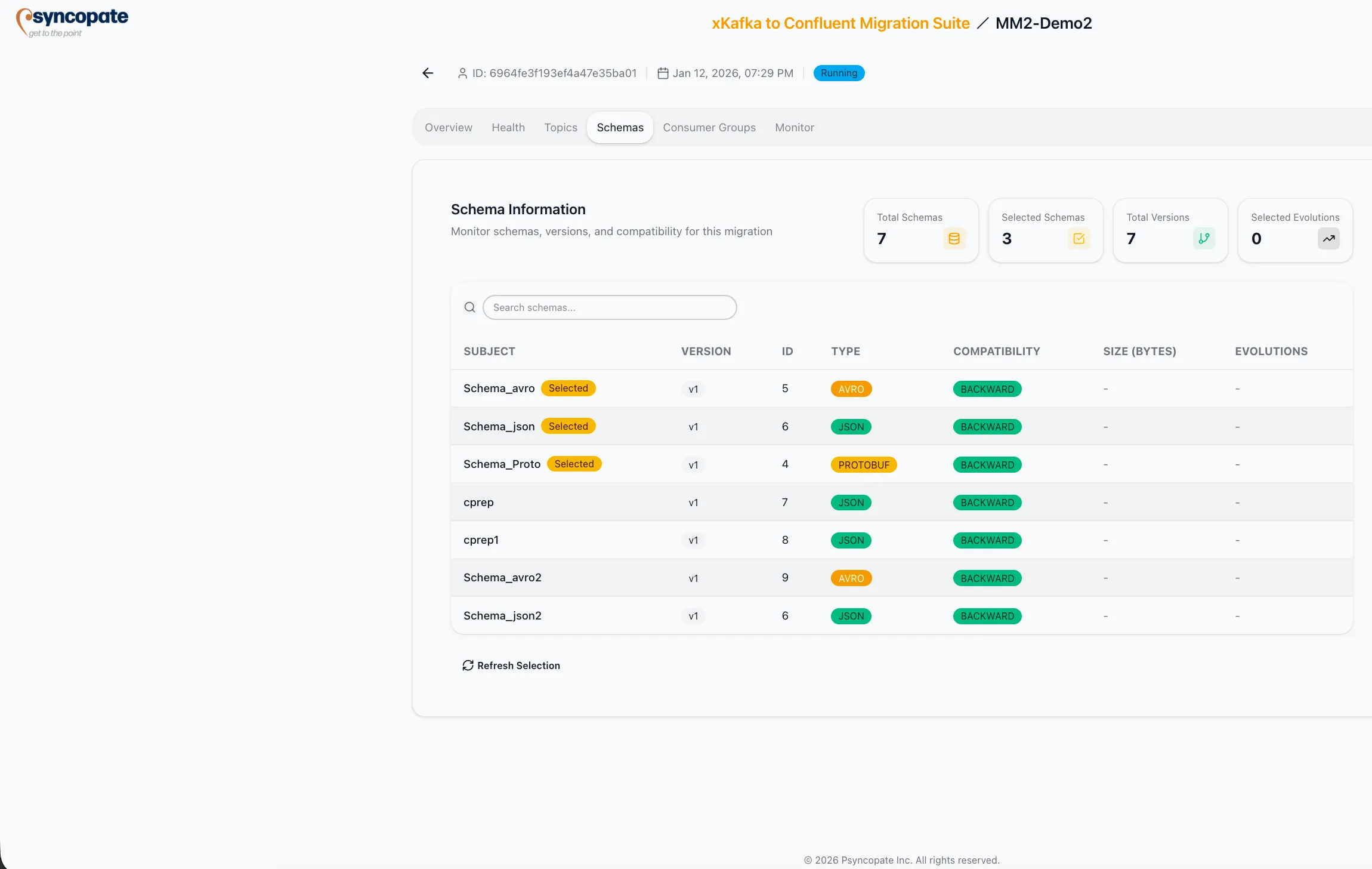
The Schemas tab displays all schemas in the migration scope, including version details, compatibility settings, and synchronization status.
Schema Statistics
Section titled “Schema Statistics”The top section displays aggregate counters:
| Metric | Description |
|---|---|
| Total Schemas | Number of schema subjects discovered on the source registry |
| Selected Schemas | Number of subjects included in the migration |
| Total Versions | Sum of all versions across discovered subjects |
| Selected Evolutions | Number of schema evolutions selected for migration |
Schema Table
Section titled “Schema Table”A table lists every discovered schema subject with the following columns:
| Column | Description |
|---|---|
| Subject | The schema subject name as registered in the source schema registry. Selected subjects display a “Selected” badge next to the name. |
| Version | Current version number of the subject |
| ID | Schema ID assigned by the registry |
| Type | Serialization format: JSON, AVRO, or PROTOBUF |
| Compatibility | Compatibility mode configured for the subject (e.g., BACKWARD, FORWARD_TRANSITIVE, FULL_TRANSITIVE) |
| Size | Schema size in bytes |
| Evolutions | Number of version evolutions for the subject |
Cloudera Schema Registry (Tern Engine)
Section titled “Cloudera Schema Registry (Tern Engine)”When the source schema registry is Cloudera, the job uses the Tern engine instead of Confluent Schema Linking. The Schemas tab adapts to reflect Tern’s behavior.
Tern-Specific Behavior
Section titled “Tern-Specific Behavior”- The Type column shows only
AVROorJSONsubjects. Protobuf and other types present on the source are not included; Tern does not migrate them. - Only active (enabled) schema versions from the source’s MASTER branch appear. Disabled versions and non-default branch versions are excluded.
- Each subject row shows a per-subject sync status: Synced, Sync Error, Pending, or Skipped.
- The Promote action is available per subject once the subject reaches Synced status. Promoting makes the subject writable on the destination registry and removes it from Tern’s sync cycle for that subject.
- Schema IDs from the source are preserved on the destination. If the destination registry already contains a conflicting ID, the subject cannot be promoted until the conflict is resolved.
Tern runs on a recurring interval and picks up new subjects added to the source after the job starts.
Tern Engine Status
Section titled “Tern Engine Status”The overall Tern engine sync status is shown on the job’s Health tab, in a Tern Sync card that displays the engine state (Running, Paused, Error, or Idle), the time of the last sync, and the count of subjects with sync errors.
Managing Schemas During Replication
Section titled “Managing Schemas During Replication”For jobs that replicate schemas through a schema exporter (Confluent source) or through Tern (Cloudera source), you can add and promote subjects from the Manage Schemas tab. This tab stays visible for the life of the job — including after every subject has been promoted — so new schemas can always be added later.
Exporter Status
Section titled “Exporter Status”The schema exporter’s overall status is shown on the job’s Overview tab, as the Schema Migration status:
| Status | Meaning |
|---|---|
| Running | The exporter is active and replicating the selected subjects from source to destination. |
| Stopped | The exporter has been stopped — typically after every subject was promoted (see below). No subjects are replicating. |
In the Schemas tab itself, each subject row shows its own sync status, and the per-row Promote action is disabled while the exporter is not running.
Adding Subjects
Section titled “Adding Subjects”Each subject on the source registry shows a status that determines how it is added:
| Status | Meaning | Adding it |
|---|---|---|
| Replicated | Already being replicated | No action available |
| Replicable | Available to add, no conflict on the destination | A simple confirmation, then the subject begins replicating |
| Conflicting | Already exists on the destination registry | A destructive force-add: the destination copy is removed and the subject is re-pushed from the source |
| Excluded | Matches an exclusion pattern set during job creation | Cannot be added |
Newly added subjects appear in the Schemas tab and begin replicating without a page refresh.
Promoting Subjects
Section titled “Promoting Subjects”Promoting a subject makes it writable on the destination registry so consumers can produce to it and evolve it, and stops replicating it from the source.
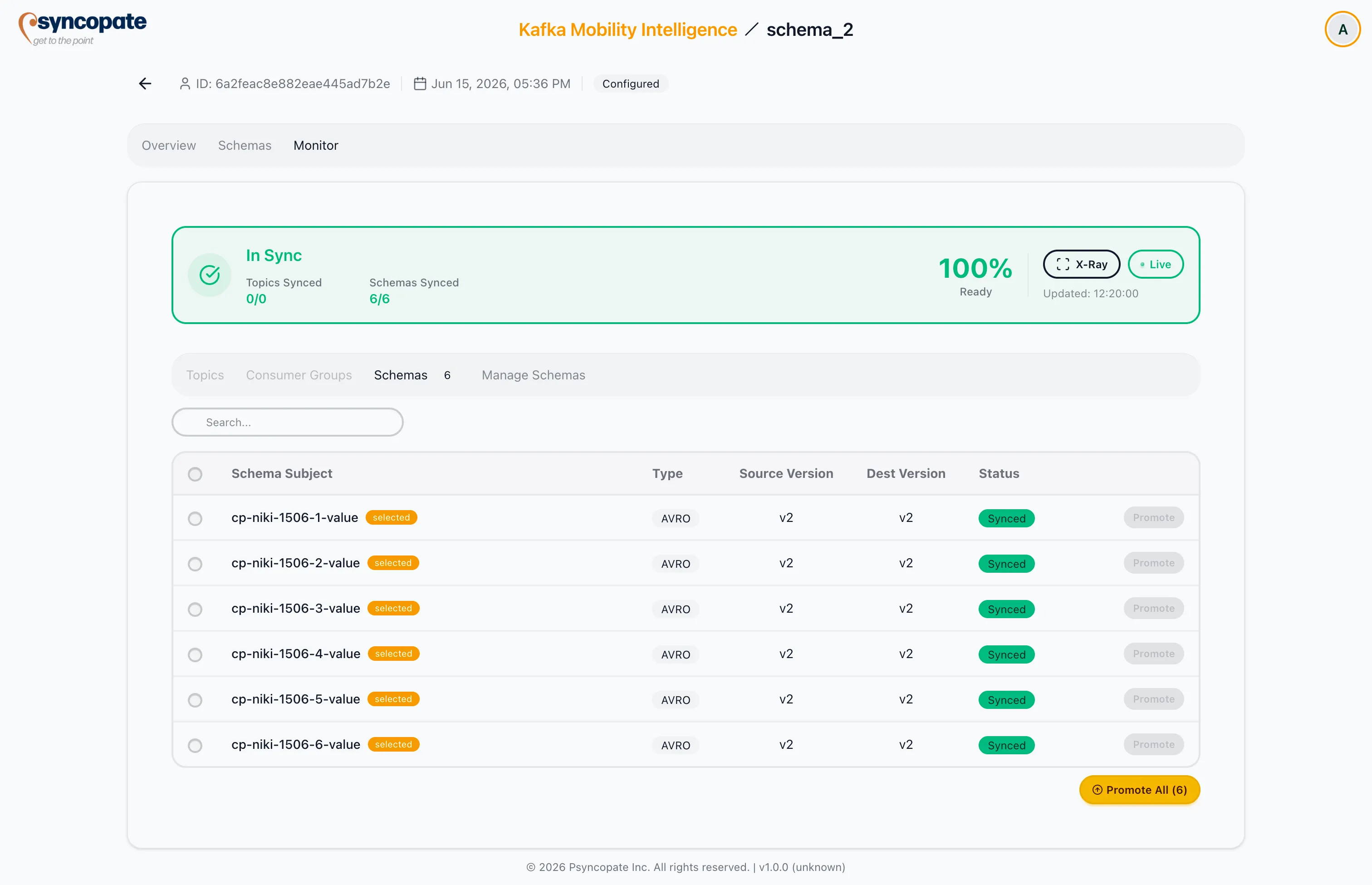
- Promote All (N) promotes every synced subject at once. It is enabled only when the exporter is running and every selected subject is synced. Confirming flips the subjects to READWRITE on the destination and removes them from the exporter; a success notification confirms the promotion.
- Promoting the last remaining subject stops and removes the exporter entirely.
Adding Schemas After Full Promotion
Section titled “Adding Schemas After Full Promotion”After every subject has been promoted and the exporter has stopped (and been removed), the Manage Schemas tab remains available so you can bring new schemas into replication. The available-schemas list includes both previously promoted subjects and any new subjects on the source.
Adding subjects at this point automatically provisions a fresh exporter (started in IMPORT mode) with the newly added subjects, then replication resumes. Once that completes:
- The exporter status returns to Running.
- The newly added subjects appear with a selected badge and begin syncing.
- Promote All becomes available again once the newly added subjects are synced.