Cluster Topology
The Cluster Topology step defines which Kafka clusters participate in the DR setup and how they are connected through replication links.
Layout
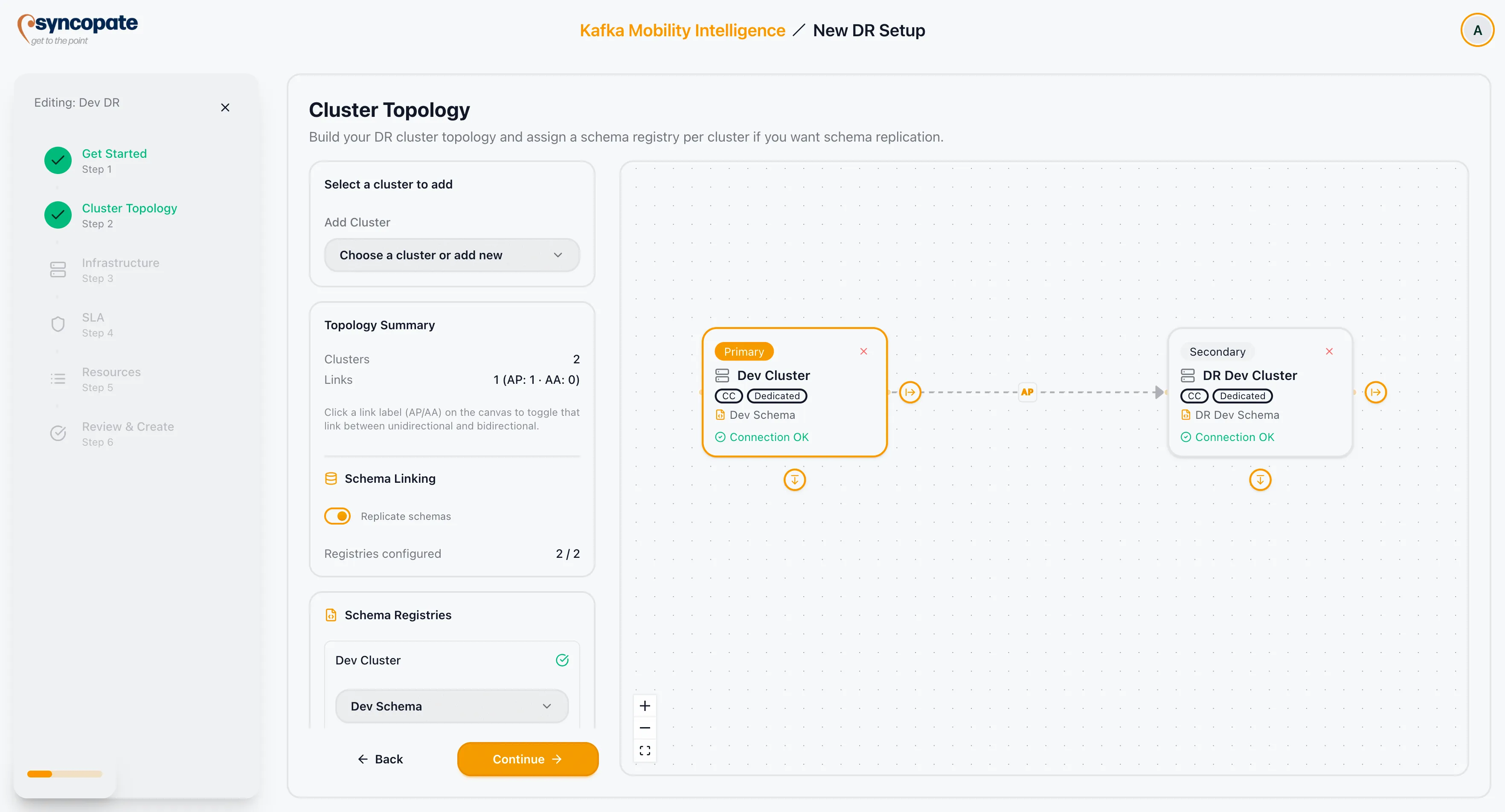
Section titled “Layout”The topology step is split into two panels:
- Left panel — cluster selector, topology summary card, schema linking toggle, and per-cluster schema registry assignment.
- Right panel — interactive topology canvas showing clusters as nodes and links as edges.
Adding Clusters
Section titled “Adding Clusters”Select a cluster from the dropdown to add it to the topology. The first cluster is added as the initial node. Each subsequent cluster is connected to the topology as a child. A connectivity test runs automatically when a cluster is added.
Incompatible clusters (WarpStream, Confluent Cloud Basic or Standard tier) are filtered from the selector or blocked with an inline error after the compatibility check.
Link Directionality
Section titled “Link Directionality”Each connection between clusters has a badge on the canvas edge:
| Badge | Link Type | Direction |
|---|---|---|
| AP | Active-Passive | Unidirectional (one-way) |
| AA | Active-Active | Bidirectional (two-way) |
Click the edge badge to toggle between AP and AA for that link.
DR Type Derivation
Section titled “DR Type Derivation”The DR type is calculated automatically from the links you configure. You do not select it manually.
| Link Configuration | Derived DR Type |
|---|---|
| All links are unidirectional (AP) | Active-Passive |
| All links are bidirectional (AA) | Active-Active |
| Mix of AP and AA links | Hybrid |
Cluster Roles
Section titled “Cluster Roles”Roles are assigned automatically based on the derived DR type and link configuration.
| Role | Used In | Description |
|---|---|---|
| Primary | Active-Passive, Hybrid | Source of truth. Traffic originates from this cluster. |
| Secondary | Active-Passive, Hybrid | Standby cluster. Promoted during failover. |
| Peer | Active-Active | Both clusters are active. Neither is designated as primary. |
Topology Validation
Section titled “Topology Validation”The wizard enforces the following before advancing:
- At least 2 clusters and 1 link are required.
- All clusters must pass their connectivity tests.
- No Cluster Linking-incompatible clusters may be present.
Chain SPOF warning — if the topology chains clusters in a sequence where an intermediate cluster is a single point of failure, a warning is shown listing the affected clusters. The wizard allows you to continue, but the warning should be reviewed before proceeding.
Schema Linking
Section titled “Schema Linking”The Replicate schemas toggle enables schema replication across clusters using Confluent Schema Exporters.
| Condition | Behaviour |
|---|---|
| WarpStream cluster present in topology | Toggle is automatically disabled; schema linking is not supported |
| Toggle enabled | Each cluster requires an assigned schema registry |
| Toggle enabled | Each assigned schema registry must pass a connection test |
Schema registry assignment and connection test results appear in the left panel below the schema linking toggle. Each cluster shows one of the following states:
| State | Indicator |
|---|---|
| Connection successful | Green checkmark |
| Connection failed | Red X with error detail |
| Testing in progress | Spinner and “Testing connection…” |